
Master the Training ADDIE Model for Course Design in 2026
 Mahmudul Hasan Rafi·
The ADDIE model is the go-to playbook for anyone serious about creating training that actually works. It’s a five-phase process that instructional designers and L&D professionals have relied on for decades to build effective, engaging learning programs from the ground up.
A Blueprint for Building Better Courses
Ever start building a course with a great idea, only to get bogged down in the details and end up with something that just doesn’t land with your audience? That’s a common frustration, and it’s exactly what the ADDIE model is designed to prevent. It provides a structured, common-sense roadmap that guides you from a vague concept to a polished course that solves a real business problem.
Think of it like building a house. You wouldn’t just start nailing boards together and hope for the best. You’d start with a blueprint (Analysis and Design), gather your materials (Development), build the structure (Implementation), and then do a final inspection to see what could be improved for the next project (Evaluation). ADDIE brings that same disciplined, professional approach to course creation.
The Five Phases of the ADDIE Model
The real power of ADDIE is in its five distinct, sequential stages. Each phase builds on the one before it, ensuring that every decision you make is intentional and informed by what you’ve already learned. This keeps your project on track and laser-focused on the goal.
This simple flow diagram shows how the process moves from one stage to the next.
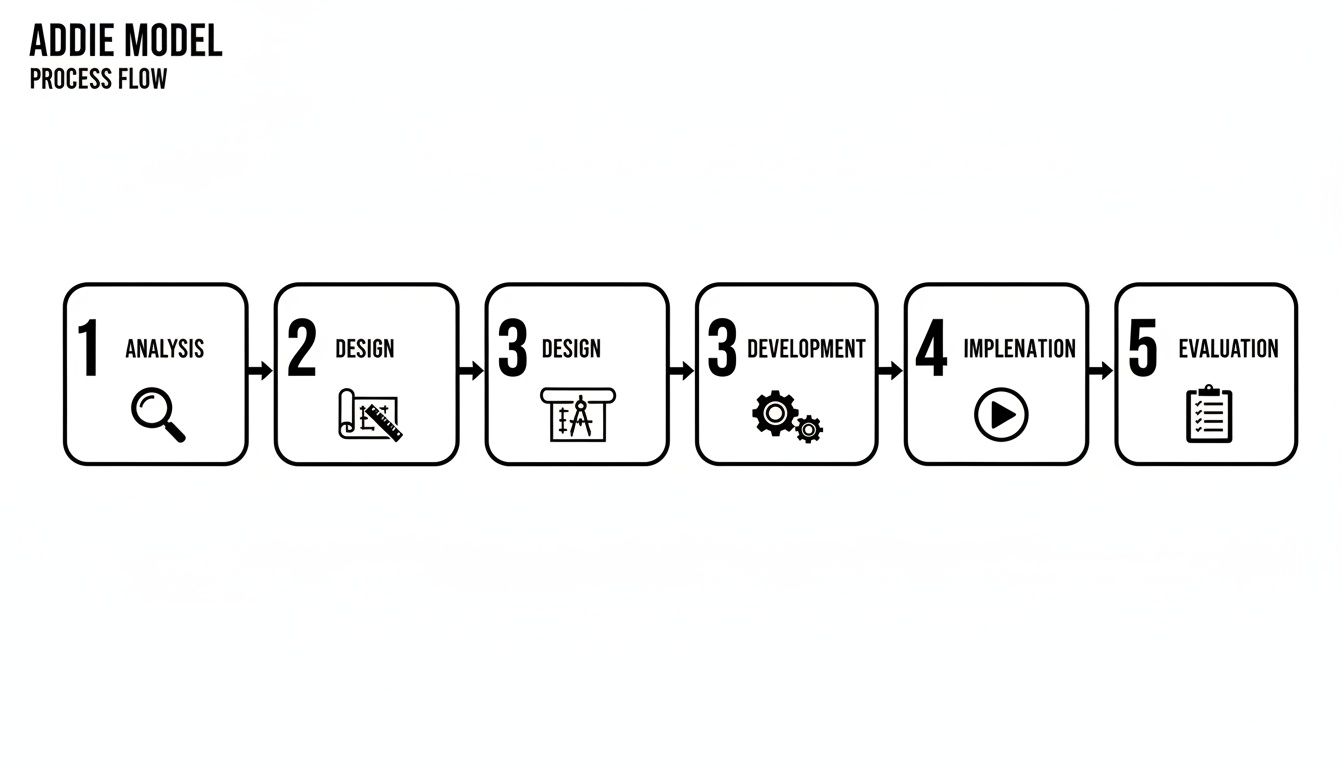
As you can see, it’s not just a straight line. The model is cyclical—the insights you gain from the final Evaluation phase feed directly back into Analysis for the next version of the course, creating a cycle of continuous improvement.
To give you a quick overview, here’s a breakdown of what each phase of the ADDIE model entails.
The ADDIE Model at a Glance
| Phase | Core Question | Key Output |
|---|---|---|
| Analysis | Who are my learners and what do they need to learn? | A detailed training needs analysis and learner profile. |
| Design | How will I structure the learning to meet the goals? | A complete course blueprint or storyboard. |
| Development | What tools and processes will I use to create the content? | The actual course materials (videos, quizzes, modules). |
| Implementation | How will I deliver the course to learners? | A launched course within an LMS and a rollout plan. |
| Evaluation | Did the training work and how can I improve it? | Data-driven reports on effectiveness and an action plan. |
This table serves as a handy cheat sheet, but the real value comes from understanding how these phases connect to deliver powerful learning outcomes.
A Proven Framework with a Rich History
While the ADDIE model feels perfectly suited for modern corporate training, it has a surprisingly deep history. It was originally developed at Florida State University in the 1970s to streamline training for the U.S. Army. The results were immediate and impressive, reducing training development time by up to 30%.
Its success in the military quickly caught the attention of the corporate world. By the 1990s, Fortune 500 companies that adopted ADDIE were reporting 25–40% improvements in employee competency. If you're curious about its origins, you can find a deeper dive into the history of the ADDIE model and its evolution over the years.
This time-tested reliability is why it’s still the gold standard. It forces you to answer the most important questions at every stage:
- Analysis: Who are we teaching and why?
- Design: What's the best way for them to learn this?
- Development: What will the final course look and feel like?
- Implementation: How do we get this into the hands of our learners?
- Evaluation: Did it work, and how do we know?
Following this process is the difference between simply "covering material" and creating a learning experience that truly drives performance.
Phase 1 Analysis: How to Build a Course People Actually Need
Let’s start with a hard truth: a great training course isn’t about what you want to teach. It’s about what your audience truly needs to learn. This is the heart of the Analysis phase, and skipping it is the fastest way to build a course that collects dust.
Solid analysis is the foundation of everything that follows. Without it, you’re just guessing.
Think of yourself as a detective for a moment. Your job is to gather evidence about your learners—their existing skills, their frustrations, their goals, and the obstacles in their way. This isn't a gut-feel exercise; it's about collecting cold, hard facts.
Why This Phase Takes the Longest
In my experience, the Analysis phase usually takes the longest — often 25–30% of the total project time. There's a very good reason for this. Rushing Analysis leads to building the wrong course.
A flawed analysis means you build the wrong training. You’ll waste weeks, or even months, on development and implementation, only to find out nobody needed it. When you take the time to dig deep here, the Design and Development phases move much faster once I have a clear direction.
Real-World Example: I built a “Digital Marketing for Small Businesses” course last year. The initial idea was to focus on high-level marketing theory. But the analysis told a completely different story. After I surveyed 87 potential learners and interviewed 12 small business owners, I discovered they needed practical, low-budget strategies rather than advanced theory.
This pivot from theory to practice was only possible because of the data I gathered upfront. It stopped me from creating a technically brilliant course that would have been completely useless to the people it was meant for.
Your Step-by-Step Analysis Checklist
A thorough analysis mixes numbers with stories. You need quantitative data (the "what") and qualitative data (the "why") to get the full picture.
Here’s a practical checklist to guide your investigation:
- Identify the Business Goal: Start at the end. What business problem will this training solve? Are you trying to boost sales figures, lower customer support tickets, or make new hire onboarding smoother? Define the finish line first.
- Define the Target Audience: Who, exactly, are you training? I spend a lot of time here talking directly to the target audience to understand their pain points and available time. Building out learner personas is a fantastic tool for this.
- Conduct a Gap Analysis: This is the core of the work. Your goal is to map the gap between your audience's current skills and the desired skills they need to hit that business goal you identified.
- Gather Data Directly from the Source: Don’t assume anything. Get out there and talk to people. A blended approach works best:
- Surveys: Quickly get measurable data from a large group.
- Interviews: Sit down one-on-one with learners and their managers to get deep, personal insights.
- Focus Groups: Get a small group together to discuss shared challenges and brainstorm solutions.
- Observation: Go watch people do the job. You'll spot real-world problems that never show up in interviews.
The Power of Data-Driven Analysis
This methodical approach isn't just about feeling confident in your direction; it has a huge impact on results. Research shows that when the analysis phase is rigorously applied, training program success rates can increase by as much as 45%. Not only that, but a thorough analysis also correlates with a 32% higher knowledge retention after the training is over. Digging in upfront makes learning stick. You can see the full findings on how systematic analysis improves training outcomes in this study.
By grounding your project in your audience's real-world needs, you’re embracing a learner-centered strategy—the key to making training that people actually value. You can read more about how to build a powerful learner-centered strategy in our guide.
Your final step in this phase is to compile all your findings into a clear project brief. This document outlines the problem, the audience, the learning goals, and any constraints. It becomes the North Star for the rest of your ADDIE journey.
Phases 2 And 3: Design And Development—From Blueprint To Reality
You’ve done the hard work of analysis, and now you have a pile of valuable data about your learners and what they need to achieve. So, what’s next? This is where we move from investigation to creation, entering the Design and Development phases of the training ADDIE model. This is where your course truly starts to come alive, first as a detailed plan and then as the real thing.
Think of it this way: The Design phase is where you become the architect. You wouldn’t just hand a pile of lumber to a construction crew and hope for a house. You’d give them a detailed blueprint. Course creation is no different. You need to map out every single element of the learning experience before you ever hit "record" or write a single quiz question.
Real-World Example: When I built the "Digital Marketing for Small Businesses" course, the Design phase was everything. I created a blueprint with 8 modules, learning objectives, storyboards for videos, and decided on a mix of lecture-style and coaching-style activities. I also mapped out quizzes and assignments here.
Crafting The Course Blueprint In The Design Phase
Your design blueprint is the single source of truth for the entire project. It's the master plan that turns your analysis insights into a tangible structure for your course. Getting this right saves you countless hours of rework down the line.
A solid design plan must include a few key things:
- Learning Objectives: What will your learners be able to do once they finish a lesson? Get specific. Use action verbs. For example, a weak objective is "Understand Facebook Ads." A strong one is, "By the end of this module, learners will be able to create a Facebook Ad campaign that targets a specific customer demographic."
- Content Structure: How will the content flow? Lay out the modules, lessons, and topics in a logical order. Decide if it’s a straight path from A to B or if learners can choose their own adventure.
- Assessment Strategy: How will you know they've actually learned something? This is where you plan your quizzes, assignments, and final projects that prove learners have mastered the material.
- Media and Modalities: What will the course look and feel like? Decide on the right mix of content. Will it be video-heavy, or will you use interactive scenarios, downloadable workbooks, or even live Q&A sessions?
This stage is all about applying sound instructional design principles. You’re not just dumping information; you’re intentionally building a clear path to mastery.
Building The Course Assets In The Development Phase
With your blueprint approved and everyone on the same page, it's time to put on your hard hat and move into the Development phase. If Design was architecture, Development is construction. You're gathering your tools and building the actual course components.
This is often the most resource-intensive part of the training ADDIE model. You're actively creating every video, worksheet, and quiz you planned out.
This is also where efficiency becomes critical, especially with video. As you bring your blueprint to life, knowing how to create training videos that actually work using AI can be a game-changer, helping you produce polished, effective content much faster.
During the Development phase, your team will be busy with tasks like:
- Recording and editing all the video lessons.
- Writing scripts and recording voiceovers (I used my Fifine mic and Audacity).
- Designing slide decks in Google Slides or PowerPoint.
- Building interactive modules in authoring tools like Articulate Rise.
- Creating the quizzes and assignments you planned in the Design phase.
A modern platform like Mentor LMS acts as your digital workshop. The drag-and-drop course builder is where you assemble all those individual assets—the videos, PDFs, and quizzes—into a cohesive and intuitive learning path for your students.
This is the moment it all comes together. The vision from your Analysis and the plan from your Design phase are now a tangible, valuable asset, ready to be launched.
Phase 4: Implementation—Launching and Supporting Your Learners
After all the meticulous planning and building, we’ve arrived at showtime. The Implementation phase is that exciting moment in the training ADDIE model when your course finally goes live and reaches your learners. But a successful launch is so much more than just flipping a switch. It's about rolling out the red carpet and creating an environment where students don't just start, but thrive.
Think of it like the grand opening of a shop you’ve poured your heart into. You wouldn’t just unlock the doors and walk away. You’d have staff ready to assist, clear signage to guide people, and a plan to make every customer’s first visit fantastic. Implementation is exactly that—it’s the art of managing the delivery and actively supporting your learners from day one.

This is where your learning management system (LMS) transforms from a content repository into your mission control. It’s no longer just a place to park videos and PDFs; it’s your command center for managing enrollment, sending communications, and keeping a pulse on learner progress. A robust LMS like Mentor lets you automate welcome sequences, schedule content drips, and see exactly how people are engaging with the material.
A Real-World Launch in Action
So, what does this look like in practice? Let’s circle back to my "Digital Marketing for Small Businesses" course. For the implementation, I launched the course, enrolled the first batch of 120 learners, monitored progress, sent reminder emails, and ran two live Q&A sessions for support. The results were very encouraging.
Real-World Course Implementation Data
| Metric | Result |
|---|---|
| Enrollment | 120 learners in the first cohort |
| Completion Rate | 84% (significantly higher than my earlier courses) |
| Average Time Spent | 6.2 hours (out of an estimated 8 hours) |
| Live Q&A Attendance | 68% of learners joined at least one session |
These numbers weren't just a happy accident. That impressive 84% completion rate, for instance, was a direct result of a blended support strategy. We didn't just upload the content and hope for the best. The launch plan included:
- A Thoughtful Welcome Sequence: As soon as a learner enrolled, they received automated emails that walked them through the course structure and set clear expectations.
- Proactive Progress Monitoring: Using the Mentor LMS dashboard, I could spot anyone who was starting to fall behind and send a quick, personalized check-in to offer help.
- Live Q&A Sessions: We scheduled two live Zoom sessions to tackle questions in real-time. This built a strong sense of community and gave learners direct access to the instructor.
- A Dedicated Forum: The course included a discussion forum where learners could ask questions, share wins, and help each other out, which sparked some incredible peer-to-peer learning.
The Power of Learner Support
Student feedback during implementation was especially positive, confirming that the support system was every bit as valuable as the course content itself.
“The course is practical and easy to follow even while running my shop.”
“I like that I could learn at my own pace but still get support when I needed it.”
One learner even shared that she landed her first client using the Facebook Ads module she completed in week 3. Seeing real results during the Implementation phase is always the most rewarding part. If you're looking to enhance your own digital delivery, our guide on computer-based training strategies offers some great ideas.
Ultimately, the goal of Implementation isn't just to launch a course. It's to create an experience that learners truly value, actively engage with, and successfully complete.
Phase 5: Evaluation — Proving Your Course Works and Planning What's Next
The Evaluation phase is where the entire training ADDIE model comes full circle. This isn't just about handing out a final report card; it's about digging into the data to prove your course’s value and pinpoint exactly how to make it even better next time. It’s the engine that drives continuous improvement.
Too many creators see this as the finish line, but experienced pros know it's actually the starting block for the next project. The insights you gather here feed directly into the Analysis phase of your next course, creating a powerful loop of feedback and refinement.
A Practical Framework for Evaluation
Instead of drowning in a sea of metrics, a structured approach keeps your evaluation focused and incredibly insightful. The most widely-used method for this is Kirkpatrick's Four Levels of Evaluation. It gives you a clear, step-by-step roadmap for measuring everything from gut reactions to real-world business results.
Here’s my simple but effective Evaluation Checklist that I use at the end of every ADDIE project.
Kirkpatrick’s 4 Levels Evaluation Template
Level 1 – Reaction (Did they like it?)
- Post-course satisfaction survey (NPS + open questions)
- Rating on content, pace, and usefulness
Level 2 – Learning (Did they gain knowledge?)
- Pre and Post quiz score comparison
- Average final assessment score (target: 80%+)
Level 3 – Behavior (Are they applying it?)
- 30-day follow-up survey: “Have you used any concepts in real life?”
- Number of learners who submitted real-world projects or case studies
Level 4 – Results (What’s the business impact?)
- Testimonials or success stories
- Any measurable outcomes (e.g., clients gained, revenue increased, time saved)
This kind of checklist helps you capture both the hard numbers (quantitative data) and the compelling stories (qualitative impact). I keep this checklist inside Mentor LMS as a reusable template. It helps me gather both quantitative data and qualitative stories quickly.

The "Course Launch" banner is a great moment, but what happens after is what truly defines your success. Once the launch excitement fades, the real work of evaluation begins by watching your dashboards and feedback channels.
Making Evaluation Systematic and Data-Driven
The good news is that modern learning platforms have made the Evaluation phase easier than ever. You no longer have to manually stitch together spreadsheets or chase down learners for a quick chat. Your LMS should be your central hub for gathering all this data.
For example, a platform like Mentor LMS can automate a huge part of this process:
- Level 1 (Reaction): The built-in student review and rating features give you instant feedback. You can also use the automated email system to send a link to your post-course survey.
- Level 2 (Learning): The quiz and assessment system provides incredibly detailed analytics. You can immediately see the difference between pre-test scores and final exam results to quantify the knowledge gain.
- Level 3 (Behavior): The assignment feature is perfect for this. Prompt learners to submit a case study or a short video showing how they’ve put their new skills into practice.
- Level 4 (Results): Positive student reviews and insightful forum discussions can be captured directly from the platform, giving you a goldmine of testimonials that showcase the course's impact.
A strong, iterative evaluation process isn't just a "nice-to-have"—it delivers far better results. When done right, ADDIE’s evaluation phase can lead to up to 50% better learner outcomes. One analysis even showed that simple post-evaluation course revisions boosted student satisfaction scores from 72% to an incredible 94%. You can explore more about the ADDIE design process and see how it directly influences course quality.
By truly embracing evaluation, you stop just building courses and start creating a data-driven system that produces high-impact learning experiences every single time. It’s the final—and arguably most important—step in mastering the training ADDIE model.
Answering Your Questions About the ADDIE Model
Knowing the theory behind the training ADDIE model is one thing; putting it into practice is another. Once you start mapping out a real course, the practical questions always start to bubble up.
Let’s tackle some of the most common questions I hear from course creators. My goal is to give you straightforward answers drawn from years of actually building and launching training programs, so you can use ADDIE as a flexible guide, not a rigid set of rules.
Which ADDIE Phase Takes the Longest and Why?
In my experience, the Analysis phase usually takes the longest — often 25–30% of the total project time. Why? Because rushing Analysis leads to building the wrong course. I spend a lot of time here:
- Talking directly to the target audience
- Analyzing their current skill gaps
- Understanding their pain points and available time
- Checking what similar courses are missing
I’ve learned that investing extra time upfront in Analysis saves me weeks of rework later in Development and Evaluation. The Design and Development phases move much faster once I have clear direction from Analysis.
How Did You Apply Each ADDIE Phase in a Real Project?
Here’s how I actually applied the ADDIE model when building a “Digital Marketing for Small Businesses” course last year:
- Analysis: I surveyed 87 potential learners and interviewed 12 small business owners. I discovered they needed practical, low-budget strategies rather than advanced theory. This helped me define clear goals and audience needs.
- Design: I created a blueprint with 8 modules, learning objectives, storyboards for videos, and decided on a mix of lecture-style and coaching-style activities. I also mapped out quizzes and assignments here.
- Development: I built the actual content — recorded voiceovers with my Fifine mic in Audacity, created slides in Google Slides, built interactive modules in Articulate Rise, and uploaded everything into Mentor LMS.
- Implementation: I launched the course, enrolled the first batch of 120 learners, monitored progress, sent reminder emails, and ran two live Q&A sessions for support.
- Evaluation: I collected completion data, quiz scores, learner feedback surveys, and conducted a 30-day follow-up to measure real-world application.
This step-by-step approach kept the project organized and prevented me from jumping straight into content creation.
Do You Have a Template for the Evaluation Stage?
Yes — here’s my simple but effective Evaluation Checklist that I use at the end of every ADDIE project:
Kirkpatrick’s 4 Levels Evaluation Template
Level 1 – Reaction (Did they like it?)
- Post-course satisfaction survey (NPS + open questions)
- Rating on content, pace, and usefulness
Level 2 – Learning (Did they gain knowledge?)
- Pre and Post quiz score comparison
- Average final assessment score (target: 80%+)
Level 3 – Behavior (Are they applying it?)
- 30-day follow-up survey: “Have you used any concepts in real life?”
- Number of learners who submitted real-world projects or case studies
Level 4 – Results (What’s the business impact?)
- Testimonials or success stories
- Any measurable outcomes (e.g., clients gained, revenue increased, time saved)
I keep this checklist inside Mentor LMS as a reusable template. It helps me gather both quantitative data and qualitative stories quickly.
While the training ADDIE model gives you a reliable framework, you still need the right tools to bring it to life. Mentor LMS is built to support you at every stage—from mapping out your curriculum with our intuitive course builder to measuring your impact with powerful analytics. It’s time to take charge of your course creation and build a learning business that’s truly yours. See how Mentor LMS helps you build better courses, faster.