
Self Hosted Learning Management System: Self-Hosted
 Mahmudul Hasan Rafi·
You know the moment. Your course platform is working, enrollments are growing, and then the vendor reminds you that growth comes with a higher plan, stricter limits, or another feature locked behind an upgrade. You want your own domain experience, your own workflows, your own payment logic, and cleaner control over student records. Instead, you're negotiating with someone else's product roadmap.
That’s usually when people start looking at a self hosted learning management system seriously.
For creators, training teams, and agencies, self-hosting isn’t just a technical deployment choice. It’s a business model decision. You stop renting the operating system of your education business and start owning it. That changes how you think about branding, data, integrations, margins, and long-term cost.
This isn’t a fringe path either. Moodle alone has over 400 million users across 240+ countries, which is why it remains the default open-source option for organizations that care about data control, customization, and predictable long-term costs, according to this overview of the self-hosted LMS market.
The End of Renting Your Online Course Business
A lot of LMS migrations start with frustration, not strategy.
A course creator launches on a SaaS platform because it’s quick. That part works. The landing pages are decent, checkout is acceptable, and the admin panel doesn’t require technical help. Then the core business requirements emerge. They want a custom student dashboard, a branded instructor experience, a different payment gateway, better control over how certificates are issued, or the ability to run a marketplace instead of a single-teacher site. That’s where the friction shows up.
The problem isn’t that SaaS platforms are bad. The problem is that they’re optimized for vendor efficiency first and customer flexibility second.
Where the pain usually starts
In practice, I see the same pressure points over and over:
- Brand restrictions: You can change logos and colors, but the platform still looks and behaves like their system.
- Pricing pressure: More students, more admins, more features, more monthly cost.
- Data anxiety: Student progress, course history, and training records sit inside a vendor-controlled environment.
- Feature bottlenecks: If the platform doesn’t support your use case, you wait, work around it, or give up.
A self hosted learning management system changes the negotiation. You decide where it runs, how it’s configured, what integrations matter, and how the learning experience should feel.
Practical rule: If your LMS is central to revenue, compliance, or customer education, treating it like a rented utility usually becomes expensive later.
Ownership changes the math
This is why self-hosted platforms continue to matter. Moodle’s scale proves the model is established, not experimental. Institutions and businesses have chosen this route for years because it gives them control over the things that get more important as the operation grows: data, customization, and cost predictability.
For a solo edupreneur, that can mean keeping a larger share of course revenue and building a brand that doesn’t look rented.
For a company, it can mean keeping training records in an environment the organization controls.
For an agency, it can mean delivering a white-label LMS that the client owns after launch.
What is a Self-Hosted LMS The Ownership Model Explained
A self-hosted LMS is software you install on server space you control. That server might be a VPS, a dedicated machine, or a managed cloud instance. The key point isn’t where it lives. The key point is who controls the environment.

The easiest analogy is housing. A SaaS LMS is like renting a furnished apartment. It’s ready quickly, maintenance is bundled in, and the landlord decides what can be changed. A self-hosted LMS is like owning the house. You choose the layout, the locks, the wiring, and who gets access.
That doesn’t mean you have to do every repair yourself. It means you decide who does the work and how the system is run.
The three things you actually own
When people hear “self-hosted,” they often think only about a website. In reality, you’re controlling three separate assets.
| Asset | What it includes | Why it matters |
|---|---|---|
| Application | The LMS software itself | You control features, updates, branding, and custom development |
| Database | Users, enrollments, grades, progress, orders, settings | This is your operational history and reporting backbone |
| Files | Videos, PDFs, certificates, images, downloads | Your course library and learning assets stay under your control |
That ownership model matters most when your LMS becomes more than a simple course catalog. If you need custom enrollments, internal workflows, compliance records, instructor commissions, or deep branding, control of these three layers stops being optional.
Self-hosted doesn’t mean isolated
People sometimes assume self-hosting means you’re cut off from support, updates, or modern tooling. That’s outdated thinking. Most serious self-hosted stacks now support structured deployment methods, managed infrastructure, external storage, transactional email services, CDN layers, and modern authentication.
A quick visual helps if you’re comparing the model to a typical vendor-run setup:
The practical takeaway is simple. A self hosted learning management system gives you control over the platform, but it doesn’t force you to become a full-time sysadmin. You can run it yourself, assign it to your internal team, or have a deployment partner manage the infrastructure while you still retain ownership.
Owning the platform and outsourcing parts of operations are not opposites. That’s how many solid self-hosted LMS deployments are run.
Self-Hosted vs SaaS A Head-to-Head Comparison
The right comparison isn’t “which model is better in general.” It’s which model fits the way you plan to operate.
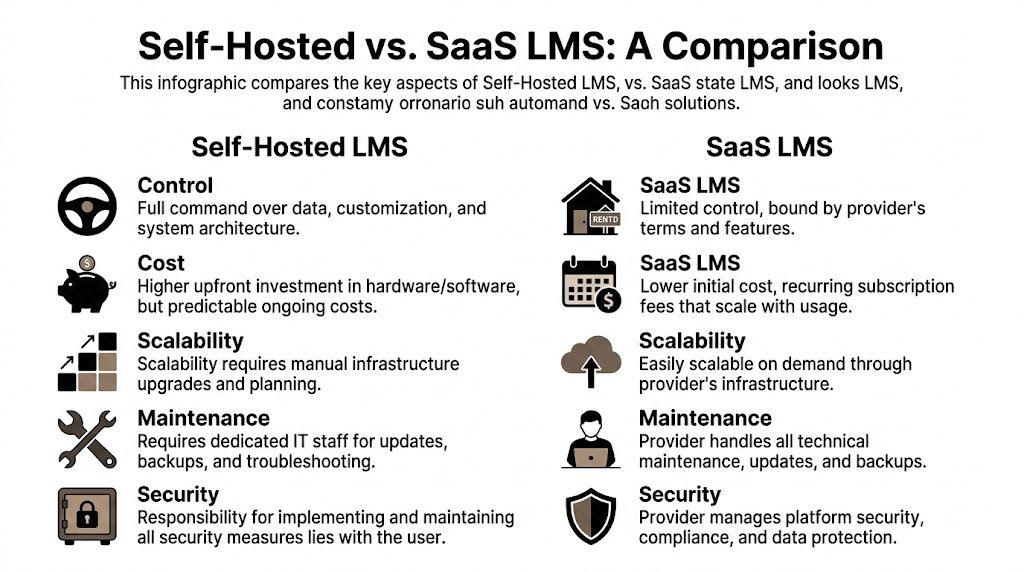
The LMS market is large and still expanding. It is valued at $28.58 billion in 2026 and projected to reach $123.78 billion by 2033, according to this LMS market statistics summary. That growth matters because organizations are treating learning platforms as core infrastructure, not side tools. In regulated environments especially, self-hosted deployments remain important because teams need direct control over compliance data, audit trails, and security protocols.
The practical decision criteria
I usually evaluate the choice across five factors.
Cost structure
SaaS looks easier at the start because there’s little setup friction. You subscribe and begin. The problem appears later when pricing expands with users, features, or admin needs.
Self-hosted usually asks for more effort upfront. But the ongoing cost pattern is easier to plan around because it’s tied more to infrastructure and support choices than to vendor tier jumps.
Customization and branding
SaaS products often let you style the shell. They rarely let you reshape the product significantly.
A self-hosted LMS gives you a different ceiling. You can modify workflows, add integrations, change page structures, build custom roles, and create a learning experience that matches your business instead of adapting your business to the platform.
Data ownership
It is here that many teams underestimate the difference.
With SaaS, you may have access to your data, but you still operate inside someone else’s system boundaries. With self-hosting, the database and file layer are part of your own stack. That matters when migration, reporting, retention, or compliance becomes important.
Scalability
SaaS scales faster at the infrastructure level. That’s its biggest operational advantage.
Self-hosted scaling is more hands-on. You need to size the server properly, watch storage, and plan for traffic spikes. The upside is that scaling happens on your terms. You’re expanding infrastructure rather than automatically being moved into a more expensive commercial tier.
Maintenance
This is the part SaaS wins cleanly. The vendor handles updates, backups, and platform operations.
With self-hosting, you own the maintenance responsibility. That’s manageable, but only if you treat it as a real operational function.
A side-by-side view
| Criterion | Self-Hosted LMS | SaaS LMS |
|---|---|---|
| Cost | Higher setup involvement, more predictable long-term operating pattern | Lower setup friction, recurring subscription costs |
| Control | Full control over hosting, codebase, and environment | Vendor-controlled platform boundaries |
| Branding | Deep customization possible | Usually template-level customization |
| Data ownership | Direct control over database and files | Access within vendor rules and export limits |
| Scalability | Requires infrastructure planning | Vendor handles infrastructure scaling |
| Maintenance | Your team or partner manages updates and security | Included in subscription |
A useful way to think about it is this: if you’re evaluating building a SaaS solution, you’re designing a product many customers will rent from you. If you need a platform your organization should control directly, the ownership model is different from day one.
For a broader product-level comparison of common LMS options, this comparison of LMS platforms is useful as a buying reference.
Key Features to Demand in a Modern Self-Hosted LMS
A self-hosted LMS can be technically “owned” and still be a bad business tool.
That’s the mistake buyers make when they evaluate only the hosting model. Ownership matters, but product capability matters just as much. If the software can’t support your revenue model, learning flow, admin process, and branding needs, you’ve only traded one limitation for another.
Monetization has to fit the business model
Start with the business mechanics, not the course builder.
Some operators sell a handful of signature courses under one brand. Others run a multi-instructor marketplace with commissions, payouts, and separate instructor workflows. Those are different businesses, so the LMS needs to support both without awkward workarounds.
Look for features like:
- Flexible selling models: Single instructor storefront, cohort sales, bundled courses, or multi-instructor marketplace support
- Payment gateway coverage: Stripe, PayPal, Razorpay, Paystack, Mollie, SSLCommerz, bank transfer, and region-specific options where needed
- Commercial controls: Coupons, taxes, revenue sharing, and refund-friendly order management
If the payment model is weak, the rest of the platform won’t save it.
Course delivery should reduce admin work
Course creation gets the marketing attention, but delivery is where teams lose time.
You want a builder that makes it easy to organize video, audio, downloadable files, assignments, drip content, and live classes without turning every new course into a manual assembly project. A drag-and-drop curriculum builder is usually the right baseline now. Without it, non-technical admins slow down quickly.
Assessments matter too. Many platforms treat exams as an afterthought attached to a course. That’s not always enough. In credential-heavy training, it’s useful to run exams as standalone products with multiple question types, timers, fullscreen delivery, attempt history, and auto-grading.
If your business sells outcomes, not just content, your exam system matters almost as much as your lesson system.
Certificates and marksheets also need more than a simple PDF stamp. You want template control, automatic issuance on completion, and enough flexibility to satisfy internal training teams or external certification use cases.
Admin tools should support real operations
A modern self hosted learning management system should make day-to-day management easier, not merely give you more knobs to turn.
Good operational features usually include:
| Operational need | What good looks like |
|---|---|
| Role separation | Clear dashboards for admins, instructors, and students |
| Communication | SMTP email support, announcements, newsletters, and discussion spaces |
| Brand control | Custom pages, SEO fields, homepage presets, and full white-labeling options |
| Localization | Multilingual interface support with RTL and LTR handling |
| Storage flexibility | Local storage plus external object storage choices |
This is also where products built for ownership tend to stand out. For example, Mentor LMS is a self-hosted option built on Laravel and React that supports solo course sites and multi-instructor marketplaces, includes drag-and-drop curriculum building, standalone exams, certificates, role-based dashboards, multilingual support, multiple payment gateways, and flexible storage options. That combination is useful because it reflects how real LMS projects grow. They rarely stay “just a course site” for long.
What usually doesn’t work
A few patterns almost always create trouble later:
- Theme-first LMS selection: Buyers choose based on homepage appearance and ignore workflow depth.
- Weak instructor controls: Marketplace plans fail when instructor roles are shallow or payout logic is unclear.
- No serious exam engine: Compliance and credential projects outgrow basic quiz modules quickly.
- Rigid page structures: Marketing teams need page-level control for SEO, promotions, and campaign landing pages.
- Poor update experience: If routine updates feel risky, the platform becomes stale.
The strongest self-hosted deployments balance two things well. They give admins enough control to shape the business, and they keep routine operations simple enough that the team indeed uses that control.
Technical and Operational Requirements
Most self-hosted LMS failures aren’t caused by bad software. They’re caused by underpowered hosting, rushed deployment, or a setup that ignores how learners use the site.
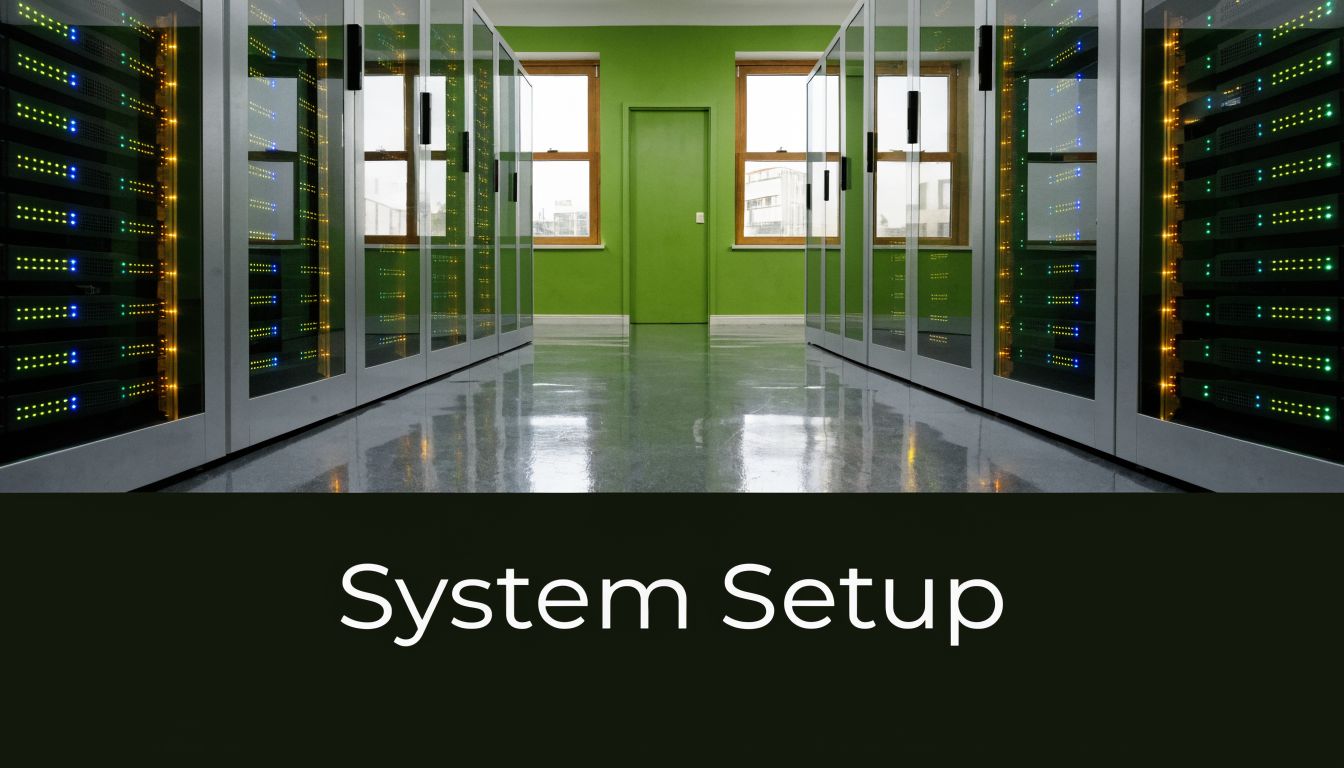
If students will watch videos, take timed quizzes, upload assignments, and log in at the same time, the server needs breathing room. Cheap shared hosting can work for small experiments, but it becomes the wrong place fast once concurrency matters.
Server specs that are realistic
For a Laravel and React LMS deployment, these are practical starting points from the content owner’s deployment guidance:
| Deployment size | Recommended specs |
|---|---|
| Small to medium site | 2 to 4 CPU cores, 4 GB RAM, 50 to 80 GB SSD, Ubuntu 20.04 or 22.04 |
| Larger site or video-heavy use | 4 to 8 CPU cores, 8 GB RAM or more, 100+ GB NVMe SSD |
For hosting, a solid VPS or cloud server is usually the right fit. DigitalOcean and Hetzner are common choices for straightforward VPS deployments. SiteGround Cloud can also work if the team wants a more managed environment.
Shared hosting is acceptable only for a small user base and very light usage. If multiple learners are streaming content or opening quizzes at once, the limits show up quickly in response time and timeout issues.
For product-level hosting details, the Mentor LMS installation requirements page gives a concrete checklist.
Installation should be repeatable
I prefer Docker on a VPS because it makes deployments more consistent and easier to recover. If the vendor provides a ready Docker Compose file, setup gets much cleaner than a hand-built stack assembled one package at a time.
A reliable installation flow usually looks like this:
- Provision the VPS with a clean Ubuntu environment.
- Deploy with Docker using the vendor’s compose file when available.
- Attach storage deliberately, especially if videos and backups will grow.
- Configure email early so password resets, enrollments, and notifications work on day one.
- Test roles and permissions before going live, not after the first customer login.
Don’t treat deployment as “get it online and fix it later.” Most LMS support tickets are caused by small setup shortcuts taken in the first hour.
The author’s brief also notes that VPS gives the best performance, even though small installations can start on shared hosting.
Architecture still matters
Modern LMS stacks benefit from cleaner architecture choices. The technical reference provided for this article notes that self-hosted platforms using headless approaches can reduce bundle sizes by 60%, and role-based dashboards in systems like Mentor LMS use Laravel Sanctum with reCAPTCHA v3, which is reported to achieve a 99.9% bot block rate. The same source also says breaches affect 30% of SaaS LMS in cited security reporting, which is part of why secure role-based authentication and commodity-cloud-friendly frameworks matter in self-hosted builds, as described in this headless LMS technical article.
That kind of engineering choice isn’t visible to buyers at first glance, but it affects admin responsiveness, login reliability, and how well the platform behaves under load.
Security and Maintenance Your LMS Cannot Ignore
Security is the part people use to talk themselves out of self-hosting. In practice, it’s a checklist and a routine.
The actual risk isn’t self-hosting itself. The actual risk is running a self-hosted LMS casually. Student data, payment events, training records, certificates, and instructor accounts all sit inside one system. That system needs basic discipline.
The security baseline
At minimum, I’d enforce this on every production LMS:
- Force HTTPS: Use an SSL certificate, redirect all traffic to HTTPS, and enable HSTS.
- Harden server access: Enable a firewall, disable root login, create a separate user, and allow VPS access through SSH keys only.
- Protect the app layer: Keep CSRF protection active, validate inputs, rate-limit login attempts, and make sure the
.envfile is never publicly exposed. - Secure admin accounts: Require strong passwords and enable 2FA where possible.
- Keep software current: Update the operating system, PHP runtime, and application dependencies on a routine schedule.
That’s not overkill. It’s normal operations.
If your team needs a broader reference point beyond LMS-specific controls, this guide to cloud security best practices is a useful companion checklist.
Maintenance is where reliability comes from
Backups, updates, and audits are boring. They also determine whether your LMS feels dependable.
A stable maintenance rhythm usually includes regular backups, test restores, malware scanning, log reviews, and scheduled update windows. One-click backup and update tools help a lot because they reduce the temptation to postpone routine maintenance.
I also recommend separating “feature changes” from “stability work.” Don’t combine a plugin change, theme edit, SMTP switch, and version upgrade in one live session if you can avoid it. That’s how small changes become outage stories.
Run your LMS like a product, not a side project. Most reliability problems come from unmanaged change, not from self-hosting itself.
What good operations look like
The author’s deployment notes are straightforward here. Properly configured self-hosted LMS environments generally perform well on good VPS infrastructure, with 99.9%+ uptime and page loads typically in the 0.8 to 1.5 second range.
The client feedback provided in the brief reinforces the same pattern:
“We switched from a SaaS platform to self-hosted Mentor LMS six months ago. Since then, our uptime has been rock solid at 99.95%, and we saved thousands on monthly fees. The platform feels faster and fully ours. No more restrictions from the SaaS provider.”
Another client running corporate compliance training reported zero downtime during peak audit season and said audit report generation became much easier than on their previous platform.
Those results don’t come from magic software. They come from a clean server, disciplined updates, proper access controls, and infrastructure that matches the workload.
Calculating the Total Cost of Ownership
At this point, most LMS buying decisions get distorted.
People compare a SaaS monthly fee to a self-hosted software purchase and stop there. That’s not a useful comparison. The right lens is total cost of ownership, which includes setup, infrastructure, maintenance, and any custom work needed to run the platform properly.
The three cost buckets that matter
A practical LMS budget usually breaks down like this:
| Cost bucket | What belongs here |
|---|---|
| One-time investment | Software license, initial deployment, migration, theme or branding setup |
| Predictable recurring costs | VPS hosting, storage, email service, domain renewals, maintenance support |
| Variable costs | Custom features, integrations, redesigns, advanced reporting, emergency fixes |
The important distinction is that self-hosting shifts more spend toward setup and infrastructure, while SaaS shifts more spend toward recurring platform rent.
What operators often miss
The hidden cost on the self-hosted side isn’t usually hosting. It’s decision-making. If you choose software that doesn’t fit your model, you end up paying developers to patch around missing workflows.
The hidden cost on the SaaS side is constraint. You may spend less time on technical operations, but more time adapting your pricing, branding, reporting, and process around a fixed product.
That’s why the financial question isn’t “Which one is cheaper this month?” It’s “Which model gives us the lowest cost for the control we need over the next few years?”
A better budgeting approach
When I scope a self hosted learning management system, I use a simple planning formula:
TCO = setup cost + annual infrastructure cost + maintenance cost + expected customization cost
Then I compare that with the annual cost of the SaaS option the team would realistically need, not the entry-tier plan they’d outgrow quickly.
For readers working through that math, this guide on the cost of an LMS is a useful budgeting companion.
If your use case is simple and likely to stay simple, SaaS may still be financially sensible. If your LMS is tied to brand control, marketplace revenue, client delivery, or internal compliance workflows, self-hosting often becomes the cleaner long-term cost structure because the business isn’t paying perpetual rent for core capabilities.
Your Next Steps and Why Mentor LMS is the Answer
A team usually reaches this stage after the same pattern repeats a few times. The SaaS bill rises, a needed workflow still sits outside the platform, and someone ends up stitching together plugins, manual exports, or support requests just to keep training delivery on track. At that point, the key decision is operational. Can you run the platform you want to own?
If your LMS affects revenue, compliance, client delivery, or brand experience, that answer often needs to be yes. Self-hosting works best for teams that are prepared to treat the LMS as a business system with owners, processes, and a maintenance budget.
A practical readiness check looks like this:
- You need control over records and assets because course content, learner data, or certificates have ongoing business value.
- You need pricing freedom that is not tied to a vendor’s tier limits, transaction rules, or feature gates.
- You need a branded learner experience that matches the rest of your business, not a platform that always feels rented.
- You expect process changes over time and want room for custom roles, integrations, reporting, or marketplace logic.
- You can assign operational ownership for hosting, updates, backups, and support after launch.
What to do next
Start by defining the operating model in plain terms. A solo course business, a partner training portal, a certification program, and a multi-instructor marketplace may all use an LMS, but they create very different requirements and support loads.
Next, write down the workflows that must work on day one. Focus on enrollment, payments, assessments, certificates, instructor permissions, reporting, language support, and media storage. That list does more than shape features. It reduces future development spend by exposing what should be solved in the base product versus what will require custom work.
Then assign responsibility for operations. Someone needs to own uptime, release testing, plugin or extension reviews, backups, and incident response. Teams that skip this step usually do not fail because of hosting cost. They fail because nobody owns the platform after launch.
Why Mentor LMS fits this model
For buyers who want self-hosted deployment and do not want recurring platform rent, Mentor LMS fits the ownership model described throughout this guide. It supports both single-brand course sites and multi-instructor setups, and it is sold as a one-time purchase with source-code ownership instead of an ongoing SaaS subscription. If a project needs more than the base installation, deployment help and custom development are available through the vendor’s support resources.
That matters for total cost of ownership. A lower sticker price means little if the software cannot support your delivery model without custom patchwork. The better outcome is software which addresses core workflows cleanly, keeps infrastructure predictable, and gives your team control over how the platform evolves.
Choose the platform the same way you would choose any long-term system. Look at fit, operating effort, customization risk, and the cost of keeping it healthy over time. Mentor LMS is a practical option for teams that want to own the platform, control the business logic, and avoid paying ongoing rent for capabilities that should sit inside their own stack.