
Cost of LMS: A 2026 Breakdown of Total Ownership Costs
 Mahmudul Hasan Rafi·
A lot of buyers start in the same place. They search for an LMS, see a monthly plan that looks manageable, and assume the cost decision is simple.
It usually isn't.
The full cost of LMS software shows up later. A low advertised fee turns into a larger bill once user caps, setup work, branding removal, integrations, support, storage, and migration all land on the invoice. I've seen teams choose a platform because the first month looked cheap, then rebuild their budget six months later because the pricing model punished growth.
That’s why smart buyers don’t price an LMS by month. They price it by ownership horizon. If you expect to run courses for years, the right question is not “What does it cost today?” It’s “What will this platform cost me over three to five years, and what control do I get in return?”
Beyond the Monthly Fee: The Full Cost of an LMS
A creator finds an LMS at a low monthly rate and signs up fast. The sales page looks clean. Course upload works. Checkout is live in a day or two.
Then the catches appear.
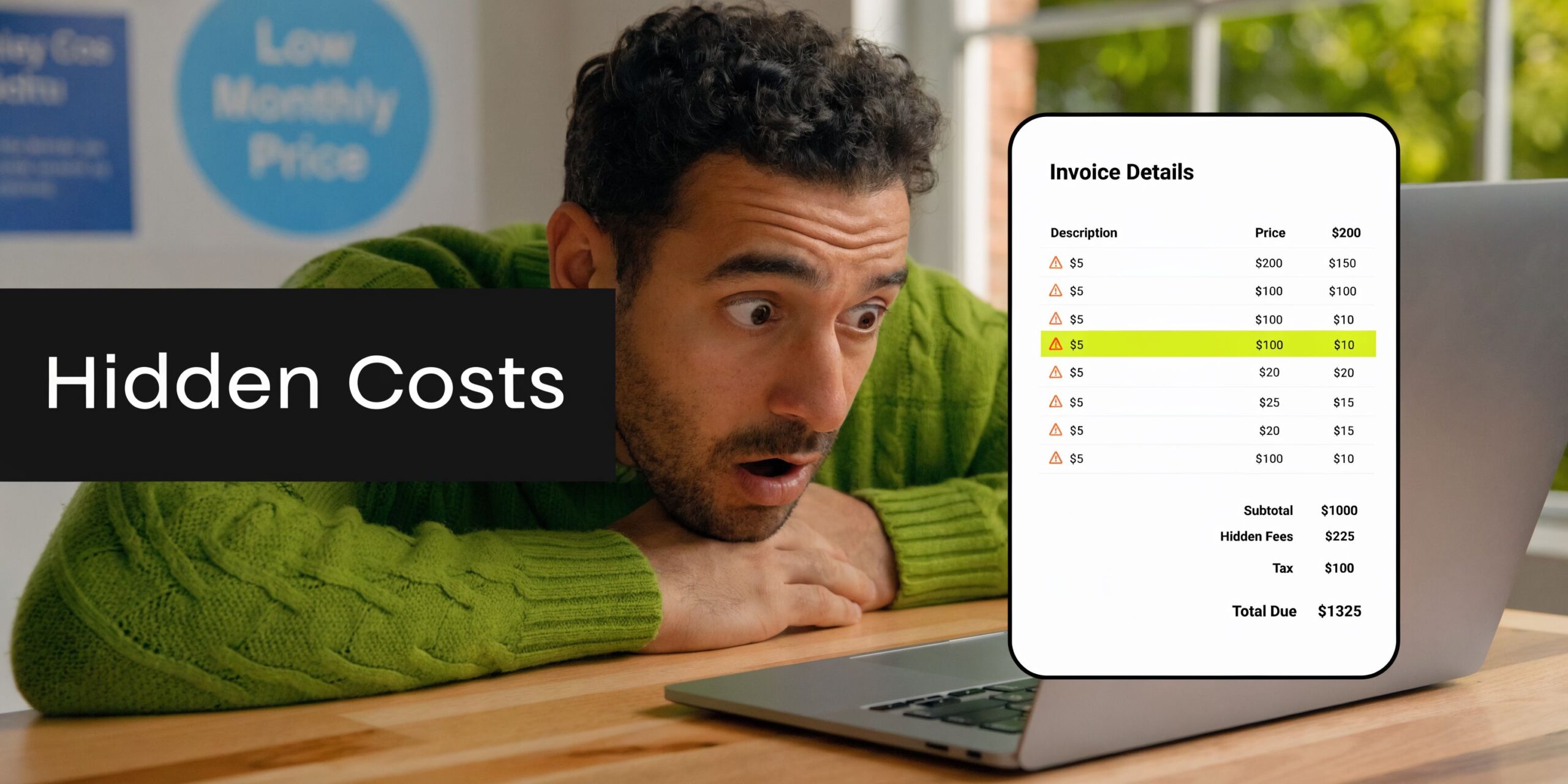
The basic plan limits users. White-labeling sits behind a higher tier. A needed integration costs extra. Support gets slower unless you upgrade. If the platform takes a cut of each sale, growth makes the bill worse. What looked affordable was only the entry fee.
Why sticker price misleads buyers
The monthly number is the easiest part of the quote to market. It is not the number that decides long-term profitability.
What matters is Total Cost of Ownership, or TCO. That means adding up the full cost of running the LMS over a realistic period, usually three to five years. For many teams, that includes software access, setup, hosting or subscriptions, upgrades, support, customization, content storage, and operational overhead.
Practical rule: If an LMS quote only shows the plan price and hides the rest until onboarding, you don't have a price yet. You have a teaser.
This matters more now because LMS decisions are no longer niche purchases. The global Learning Management System market is projected to reach $28.1 billion in 2025, reflecting a broad shift toward scalable digital training infrastructure, according to EnsaanTech’s LMS market analysis.
The expensive mistake people repeat
The common mistake is treating LMS software like a small app subscription. It isn't. For many businesses, the platform becomes the delivery engine for onboarding, paid courses, compliance, certification, internal training, or a multi-instructor marketplace.
That means your LMS isn't just software. It becomes part of your business model.
A cheap platform can still be a bad financial choice if it locks core features behind upgrades, charges more as your audience grows, or makes you dependent on the vendor for every change. A platform with a higher upfront cost can still be the cheaper choice if it keeps recurring costs predictable and gives you control over the stack.
Buyers who understand the cost of lms properly stop asking, “What’s the cheapest plan?” They ask, “Which pricing model keeps me profitable as I grow?”
SaaS vs Self-Hosted Choosing Your Financial Model
The simplest way to understand the cost of lms is to separate the two financial models.
One is SaaS: You rent access.
The other is self-hosted: You own the software and pay to run it.
SaaS feels lighter at the start
SaaS is the easier entry point. You pay a monthly or annual fee, log in through the vendor’s system, and avoid handling infrastructure directly.
That appeals to small teams because cash flow stays light in the beginning. But the trade-off is obvious once the platform becomes important. You don’t control the environment, you don’t control the roadmap, and your costs usually rise with users, features, or both.
According to Hubken Group’s LMS pricing guide, SaaS-based LMS solutions often cost $3,000 to $20,000 per year for SMBs, with Docebo starting around $25,000 per year for 200 learners and Teachable’s Business plan costing nearly $6,000 per year.
That range tells you something useful. SaaS pricing is not one market. It spans from modest subscriptions to serious recurring spend.
Self-hosted changes the equation
Self-hosted is closer to ownership. You buy the software or license, install it on your own hosting, and control how it runs.
That shifts spending away from software rent and toward infrastructure, setup, and occasional technical work. For creators and small businesses, that often means a more predictable budget. For agencies and organizations, it also means better control over branding, integrations, and data.
Here's a quick overview:
| Model | Feels like | Main cost pattern | Main trade-off |
|---|---|---|---|
| SaaS LMS | Renting | Ongoing subscription | Less control, recurring liability |
| Self-hosted LMS | Owning | Upfront setup plus hosting | More responsibility, more control |
The strategic difference matters more than the accounting format. Renting reduces initial friction. Owning reduces long-term dependency.
When buyers compare SaaS and self-hosted fairly, they stop comparing setup convenience alone. They start comparing control, scaling behavior, and what happens when the platform becomes mission-critical.
What works and what doesn't
SaaS works well when a team needs fast deployment, minimal technical involvement, and can live with the vendor’s rules.
It works poorly when the business needs custom workflows, white-label delivery, unlimited growth without pricing jumps, or predictable long-term margins.
Self-hosted works well when ownership matters. It is often the better fit for edupreneurs, training companies, agencies launching client portals, and organizations that don’t want to renegotiate pricing every time usage grows.
For a more direct comparison of control, cost, and deployment trade-offs, this breakdown of SaaS vs self-hosted LMS is a useful frame.
A Complete Breakdown of LMS Line-Item Expenses
Most budget mistakes happen because teams price the platform but forget the surrounding costs. A useful LMS budget needs two buckets: One-time expenses and recurring expenses.
If you don't split them clearly, the cost of lms always looks smaller than it really is.
One-time expenses you should price first
These are the costs tied to launch, migration, and initial setup.
Software license or purchase
This may be a one-time license for a self-hosted LMS or an implementation fee tied to a SaaS contract.Setup and installation
Someone has to configure the platform, connect the domain, prepare roles, and make sure the system is usable on day one.Branding and design work
Even simple changes such as logos, colors, layout adjustments, and email templates can add cost if the platform doesn't include easy white-label controls.Migration from another LMS
If you're moving users, courses, certificates, or training records, budget time and money for cleanup and transfer.Initial custom development
This includes special reports, custom enrollment flows, CRM connections, or unique checkout behavior.
A lot of buyers treat these as “optional.” They often aren't. If the out-of-the-box workflow doesn't match the business, setup becomes real cost immediately.
Recurring expenses that shape TCO
Recurring costs decide whether the platform stays affordable after launch.
For self-hosted systems, the major line item becomes infrastructure and maintenance. According to Disprz’s LMS pricing guide, for self-hosted LMS platforms, infrastructure and maintenance can total $20,000 to $100,000 annually for mid-scale deployments. That range is a reminder that architecture matters. Efficient systems stay manageable. Bloated ones get expensive fast.
For everyday budgeting, watch these recurring lines:
Subscription fees
This applies to SaaS platforms. The fee may be monthly or annual, but it usually remains the anchor cost.Web hosting
Self-hosted buyers need server resources, backups, and enough headroom for traffic, uploads, and concurrent learners.Domain renewal
Small line item, but still part of the annual operating budget.Video hosting or CDN usage
Video-heavy training libraries often push hosting costs higher, especially when playback volume grows.Payment gateway fees
If you sell courses, gateway charges sit outside many LMS quotes but still affect platform profitability.Maintenance and support
This covers updates, troubleshooting, plugin conflicts, security review, and bug fixes.Third-party integrations
Email tools, CRM sync, webinar tools, and reporting systems can all add recurring software or support cost.
A practical budgeting lens
When I review LMS budgets, I usually want one simple worksheet. It should answer four questions.
- What do we have to pay before launch?
- What do we pay every month or every year?
- Which costs rise when we add more learners, instructors, or media?
- Which costs are under our control, and which belong to the vendor?
That last one matters. Vendor-controlled costs are the ones that surprise teams later.
If you need a good parallel example of how hidden infrastructure choices affect software spending, this complete guide to the cost of Amazon WorkSpaces is useful because it shows the same budgeting discipline. Base software cost rarely tells the whole story.
A cleaner way to think about it
| Cost type | Common examples | Usually fixed or variable |
|---|---|---|
| One-time | License, setup, migration, launch customization | Mostly fixed |
| Recurring | Subscription, hosting, support, video delivery, domain | Mixed |
| Growth-sensitive | Per-user charges, storage, bandwidth, premium integrations | Variable |
The biggest budgeting mistake is assuming recurring cost equals predictable cost. It doesn’t. Some recurring costs stay flat. Others expand every time your LMS becomes more successful.
Comparing LMS Cost Scenarios by TCO
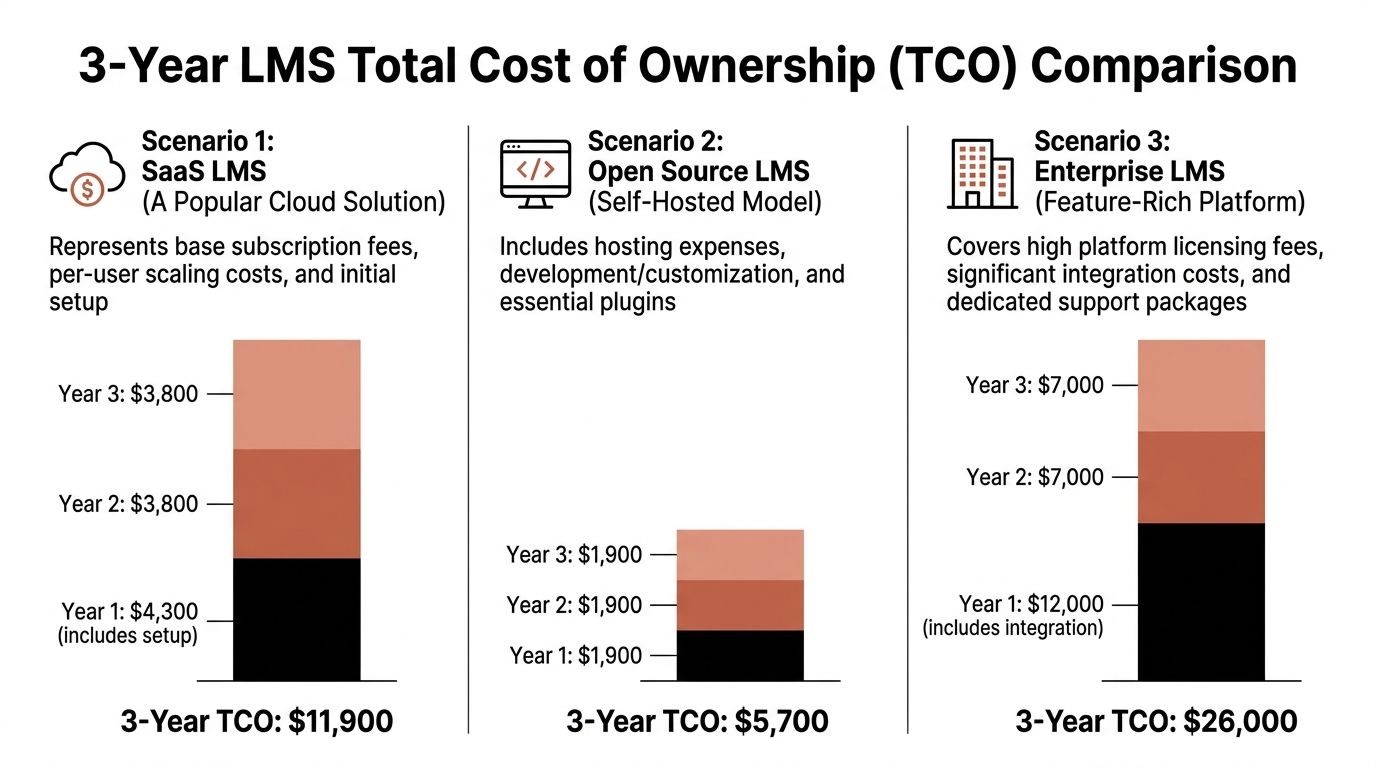
Three buyers can launch an LMS for the same broad goal and end up with completely different financial outcomes. That’s why line items matter less than model behavior over time.
Below are three common scenarios I see in real evaluations. One is a typical SaaS subscription. One is a “free” open-source route. One is a one-time purchase self-hosted setup with a light operating footprint.
Scenario one with a typical SaaS LMS
This is the most common starting point for creators and small businesses. The platform is ready quickly. Support exists. Hosting is bundled.
The problem is that cost scales with the vendor’s rules, not yours.
The broad market data already shows where SaaS can end up over time. According to Excellent WebWorld’s LMS cost analysis, five-year SaaS LMS costs can reach $118,000 to $292,000, while self-hosted solutions range from $50,000 to $200,000, and hidden SaaS costs can double the advertised budget.
For a smaller operation, the pain usually starts before those five-year totals. The first bill looks acceptable. Then add-ons arrive: A better reporting plan, white-label access, setup, more users, more storage, a paid integration.
What works in SaaS:
- Fast launch: Good when speed matters more than long-term flexibility.
- Low internal IT burden: The vendor manages core infrastructure.
- Standardized workflow: Useful if your training model is simple.
What doesn't:
- Growth-sensitive pricing: Success often triggers larger bills.
- Vendor dependence: Important changes may require a plan upgrade or support request.
- Weak margin control: Course businesses feel this quickly.
Scenario two with open source that looks free
Open-source LMS software attracts buyers for one obvious reason. No software license fee.
That creates a dangerous illusion. Free code is not free deployment.
Open-source can work well if the buyer already has technical resources, understands maintenance, and accepts that updates, security, compatibility, and performance all become internal responsibilities. It fails when a non-technical team assumes “free” means easy.
The hidden cost here isn't a visible subscription. It's labor.
That labor shows up in setup, plugin management, bug fixing, server tuning, backups, and every version upgrade. If a plugin breaks during an update, your team pays in time or outside developer hours. If the site slows down under load, your team pays again.
Open source is cheap only when your organization already knows how to run open source systems. For everyone else, the invoice arrives in technical overhead.
This route can still be financially sensible. But only if you value flexibility enough to own the operational burden.
Scenario three with a one-time purchase self-hosted LMS
This model usually gives the cleanest TCO picture for creators, edupreneurs, and small businesses that want ownership without building custom software from scratch.
Here’s a real deployment-style breakdown from the content owner’s operating model:
| Cost item | Amount |
|---|---|
| Lifetime license | $59 |
| Basic setup and installation | $150 |
| Minor branding customization | $120 |
| Total one-time cost | $329 |
| Annual hosting | $180 |
| Annual domain renewal | $12 |
| Total recurring annual cost | $192 |
That’s a very different cost structure from subscription-first systems. The software cost is paid once. The recurring budget stays focused on hosting and domain. Optional customization remains separate instead of being built into a mandatory plan ladder.
One product in this category is Mentor LMS pricing calculator, which is useful for modeling one-time purchase scenarios and comparing them against recurring subscription assumptions.
The operational behavior here is what matters. Costs don't automatically jump because you add more courses or instructors. The main scaling pressure comes from infrastructure, especially hosting and media delivery.
Which model breaks even faster
For marketplace operators, the financial model becomes even more important. According to Brights’ LMS build cost guide, edupreneurs building multi-instructor marketplaces can break even in 4 to 6 months with a self-hosted model, compared with 12 to 18 months on a SaaS platform that takes a 5 to 10 percent cut of revenue.
That gap matters because a marketplace is not just training software. It is a revenue engine. If the platform takes a share of every sale, your LMS becomes an expanding tax on growth.
A self-hosted one-time purchase model works best when:
- You expect to operate for years
- You want direct control over margins
- You need white-label or marketplace features
- You don't want vendor lock-in
SaaS works best when:
- You need immediate simplicity
- You can tolerate recurring cost growth
- You don't need deep control
The cost of lms becomes clearer once you stop comparing launch prices and start comparing financial behavior over time.
The Hidden LMS Costs That Drain Your Budget
Most LMS overspending doesn't come from the number on the pricing page. It comes from the charges that appear after the contract starts.
That’s where budgets get distorted.

Five budget drains buyers miss
Revenue sharing
Some platforms don't just charge a subscription. They also take a cut when you sell. That means your fee rises when your business performs better.
For course sellers and marketplace operators, this is one of the worst long-term pricing mechanics because it punishes success.
Feature-gated upgrades
A plan looks affordable until you need white-labeling, advanced reporting, more admins, better automation, or API access. Then the platform pushes you into a higher tier.
This isn't always dishonest. But it often means the “real” plan cost is the upgraded one, not the one advertised first.
Integration charges
Your LMS rarely lives alone. It needs payment gateways, email tools, CRM sync, webinar tools, HR systems, or analytics.
Those connections can trigger setup charges, third-party subscription costs, or custom development work. If you want a clear sense of what that maintenance and custom work can involve in a self-hosted environment, the Mentor LMS maintenance and custom development docs show the types of tasks teams typically budget for.
Video delivery costs
Video is where many self-hosted and SaaS budgets both drift upward. Large libraries and heavy student viewing can force higher hosting plans or external media delivery.
This doesn't make video a bad choice. It just means media should be budgeted as infrastructure, not treated as “free” because the LMS itself is installed.
A short explainer can help if you're evaluating platform pricing with these gotchas in mind:
Implementation and add-ons
The big hidden cost category is everything sold after the initial quote: Implementation, migration, onboarding, premium support, and specialized modules can all enlarge the budget.
Buyers usually don't blow the budget by choosing an expensive LMS. They blow it by choosing an incomplete quote.
Why this matters over the long term
The long-range numbers make the problem hard to ignore. As noted earlier in the article, the market data shows a major gap between recurring and owned models over multi-year horizons. The practical lesson is simple. Small hidden charges become large TCO differences when repeated for years.
The safest way to price the cost of lms is to assume the published plan is only one layer. Then ask what happens when you need branding, integrations, growth, support, and media at the same time.
Actionable Strategies to Minimize Your LMS Costs
Cutting LMS costs doesn't mean buying the cheapest software. It means making fewer expensive decisions.
The strongest budgets usually come from scope discipline, ownership clarity, and infrastructure choices that fit the business model.
Start with the smallest viable feature set
Many teams overspend before launch, not after it. They try to solve every future use case on day one.
A better approach is to define the minimum system that can operate safely and sell or deliver training well. Core course delivery, learner management, payments if needed, certificates if required, and only the integrations that are operationally necessary.
Everything else goes on a later roadmap.
Keep the launch version boring. Fancy requirements are where LMS budgets get damaged first.
Choose a pricing model that matches your business
If you're running training for years, ownership usually beats renting on financial predictability.
A one-time purchase model removes software subscription pressure and leaves you with operating costs you can manage. That’s especially useful for creators, agencies, and small businesses that need stable margins.
In this category, Mentor LMS is one option. It is a self-hosted LMS built on Laravel and React, sold as a one-time purchase, with hosting handled separately. That structure changes the cost conversation because the software itself is not a recurring fee.
Avoid platforms that charge you for growth
The wrong LMS gets more expensive every time you add users, instructors, or functionality. The right one lets you grow and mainly asks you to scale infrastructure when usage requires it.
Before choosing, ask:
- Will adding more courses raise software cost?
- Will more instructors force a plan upgrade?
- Will branding removal cost extra?
- Do we lose revenue share on sales?
If those answers are vague, your budget probably won't hold.
Control infrastructure instead of guessing
Hosting doesn't need to be expensive. But it does need to fit your media usage and learner volume.
That means planning for:
- A realistic hosting tier: Not the cheapest plan if the site includes live classes or heavy video.
- Smarter video handling: Compress files well and use external media delivery when needed.
- Simple backup routines: Recovery planning is cheaper than emergency fixes.
If you're trying to build a broader internal framework for reducing recurring software and infrastructure waste, these IT cost optimization strategies are worth reviewing because the same logic applies to LMS budgeting.
Prefer systems with strong documentation
Documentation lowers cost in a quiet way. It reduces setup time, lowers support dependency, and makes small changes possible without paid developer help every time.
That matters more than buyers think. A well-documented self-hosted system can be cheaper to operate because the team can solve routine tasks without opening a custom support ticket.
The cost of lms stays low when you reduce recurring dependencies, not just when you negotiate a lower starting price.
Conclusion Focus on Lifetime Value Not Monthly Fees
The full cost of lms has very little to do with the number that appears first on a pricing page.
What matters is the financial model behind it. SaaS gives speed and convenience, but it often turns the LMS into a recurring liability. Self-hosted ownership asks for more responsibility, but it usually creates a clearer long-term budget, more control, and fewer surprises as the platform grows.
That’s the key shift buyers need to make. Stop evaluating LMS software like a monthly app. Start evaluating it like business infrastructure.
When you look at TCO instead of sticker price, the trade-offs become easier to see. Vendor lock-in becomes visible. Feature-gated pricing becomes visible. Revenue-share pain becomes visible. So does the value of paying once for software and keeping ongoing costs focused on hosting, maintenance, and only the custom work you need.
For edupreneurs, agencies, and small organizations, that ownership model is often the cleaner path. It aligns cost with real operations instead of tying cost to a vendor’s pricing ladder.
The best LMS decision is rarely the cheapest launch. It’s the one that still makes financial sense years later.
If you want an LMS you can own instead of rent, Mentor LMS gives you a self-hosted path with a one-time purchase model, unlimited courses, students, and instructors, plus support for solo course sites and multi-instructor marketplaces. It's a practical fit if you care more about long-term control and predictable costs than another monthly subscription.