
Build Better Courses With Training Program Templates in 2026
 Mahmudul Hasan Rafi·
Think of a training program template not just as a document, but as your master blueprint for building learning experiences that are consistent, scalable, and actually work. It’s the difference between throwing together training on the fly and engineering repeatable success that aligns directly with your company's goals.
Why Smart Training Program Templates Are a Game Changer
Let's be real—building every new training program from scratch is a massive time sink. It’s a recipe for inconsistency and a surefire way to burn out your L&D team. You end up reinventing the wheel for every onboarding class or compliance update, and the quality often suffers. This is exactly where a well-crafted template stops being a nice-to-have and becomes your most valuable tool.

I’m not talking about those generic, one-page outlines you find floating around online. A truly effective template is a robust framework that turns your learning and development efforts from a necessary expense into a genuine performance driver. By creating a solid, repeatable system with these templates, you can unlock serious efficiencies. It's similar to how finance teams create structured, repeatable systems to generate reports from Excel data—you’re building a reliable process for a predictable outcome.
From Generic Document to Strategic Blueprint
The table below shows the leap from a basic outline to a powerful, customized training blueprint. A generic document often feels disconnected and rarely addresses what a company actually needs. It's just a placeholder.
| Feature | Before (Generic Template) | After (Customized Version) |
|---|---|---|
| Objectives | Vague goals like "Improve skills." | Specific, measurable KPIs like "Reduce support ticket resolution time by 25%." |
| Branding | No branding, feels impersonal. | Includes company logo, colors, and tone of voice. |
| Content | Generic placeholder sections. | Mapped to internal competency frameworks and role-specific needs. |
| Audience | "For all employees." | Targeted at specific teams, e.g., "New Sales Hires, Q3 2026." |
| Engagement | Lacks interactive elements. | Includes built-in quizzes, checklists, and feedback loops. |
| Ownership | Feels like a downloaded file. | A professional asset the L&D team proudly presents to leadership. |
In short, a customized version becomes a strategic asset. By baking in your company's branding, specific team goals, and key performance indicators, the template is transformed. It becomes a professional tool that gets your team excited to deliver training.
I’ve heard from countless clients that a customized template feels “made for us,” not just copied from the internet. That feeling of ownership is what gets you buy-in from the top down and makes people actually want to participate.
The template I customize most often for corporate clients is the Corporate Training Program Template. This works as the master blueprint for their employee training initiatives — whether it's onboarding, compliance, leadership development, or skills upgrading. You start with this solid foundation and then tailor it to the specific industry, team size, and goals you're working with.
The Tangible Business Impact
Moving to a structured training framework isn't just about making life easier for L&D; it delivers real, measurable results.
We've seen companies that adopt predefined templates achieve a 24% reduction in onboarding errors and get new training programs out the door 30% faster.
The impact on performance is even more staggering. One comprehensive study found that organizations with standardized training plans saw employee productivity jump by an incredible 218% compared to those still using an ad-hoc approach.
This data makes it clear: a great training template isn't just about saving time. It’s about minimizing risk, launching programs faster, and directly connecting your training efforts to business growth. You stop hoping for results and start designing for them.
What Goes Into a Truly Great Training Template?
I've seen hundreds of training templates over the years. Some are brilliant, forming the backbone of entire learning programs. Others? They just collect digital dust in a forgotten folder. The difference isn't complexity; it’s about having the right building blocks from the start.
A solid template does more than just list topics. It tells a story—why the training matters, who it's for, and what success actually looks like.
After years of building these for corporate clients, I’ve found there are ten essential pieces. If you include these, your plan will be complete, measurable, and genuinely useful for everyone involved, from the training team right up to company leadership.
Start with the Strategic Foundation
Before you ever think about modules or quizzes, you have to get the "why" and "who" right. Skipping this is like trying to build a house without a blueprint. It creates programs that miss the mark and don't connect to what the business actually needs.
Training Overview / Purpose: This is your elevator pitch. It’s a sharp, clear statement on why this program exists and how it ties directly to a business goal. Forget vague statements. Instead of "Improve sales skills," try: "This program exists to reduce new-hire time-to-productivity by 30%, directly supporting the company's Q4 sales targets."
Target Audience & Prerequisites: Get specific. Who is this training really for? What do they need to know before they even start? Defining your audience as "Tier 2 Support Agents with at least 6 months of experience" is much better than "Support Staff." It ensures the content hits the right level and nobody's time is wasted.
Learning Objectives (SMART Goals): This is where you define what people will be able to do after the training. These must be measurable. "Learn the new software" is a hope, not an objective. A SMART objective is concrete: "By the end of this module, participants will be able to process a customer return using the new software in under 3 minutes with 95% accuracy."
This isn't just academic. A 2026 Rippling survey showed that 92% of teams using SMART objectives in their training templates hit 100% compliance on mandatory courses within 30 days. That's a massive reduction in regulatory risk. You can find additional insights about employee training plans on Rippling.com.
Map Out the Learning Experience
Once the strategic pieces are in place, you can start detailing the "what" and "how" of the training itself. This is where you lay out the curriculum and logistics for learners and their managers.
Program Structure / Curriculum Outline
This is your module-by-module, lesson-by-lesson breakdown. For each entry, list the topic and a realistic time estimate. This simple detail helps everyone plan their schedules and manage expectations.
Delivery Method
How are people going to take this training? Be crystal clear if it's:
- Self-paced: Learners work through it on their own time.
- Instructor-led: Live sessions, either in-person or virtual.
- Cohort-based: A group learns together on a set schedule.
- Blended: A mix of different methods, like self-paced videos followed by a live Q&A.
I always push clients to define this early. A program designed for self-paced delivery looks very different from one built for a live, interactive workshop. The delivery method impacts everything from content creation to assessment design.
Close the Loop with Accountability and Measurement
A template isn’t finished until it outlines how you'll measure success and who is responsible for what. These final sections are what turn a training plan into a business asset and are absolutely critical for proving its value. For a deeper look at the theory behind this, our guide on instructional design principles is a great resource.
Here’s what you need to include:
Assessment & Evaluation Methods: How will you know they learned it? Specify if you'll use quizzes, final projects, skill demos, or observations.
Timeline & Schedule: This provides the 30,000-foot view. It should show key dates, from the program kickoff to the final evaluation, so everyone knows the overall duration.
Resources & Materials Needed: Make a simple list of everything a learner will need. This includes videos, articles, worksheets, or access to specific software. No surprises.
Roles & Responsibilities: Who does what? Clearly define who is facilitating, who answers questions, who provides tech support, and who handles follow-up evaluations.
Success Metrics / KPIs: This is the money section. These aren't learning objectives; they are business metrics. How will you measure the program's real-world impact? Think in terms of completion rates, yes, but also performance improvements (like a 10% increase in sales) or a reduction in support ticket escalations. This is what proves your training's ROI to leadership.
Here’s a look at how you can adapt your core training template for just about any situation you’ll encounter.
From Generic to Company-Specific: A Case Study
The difference between a generic template and a fully customized one is night and day. I remember working with a client where we started with a standard one-size-fits-all version with basic sections like “Course Title,” “Objectives,” and “Duration.” It was functional but felt completely impersonal and clients often said it didn’t reflect their company’s specific needs or branding.
Their feedback was polite but clear: this doesn't feel like us.
So, we went back to the drawing board and customized it.
The Transformation: First, I added the client’s logo and color palette. It’s a small change, but it instantly made the document feel like it belonged to them. Then, we integrated their specific competency framework, which meant we could directly link every training module to career progression paths. We added role-based learning paths and incorporated their internal KPIs (e.g., “Reduce support ticket resolution time by 25%”).
The result? A professional, branded document that the L&D team could present directly to their leadership. The feedback was immediate and enthusiastic. Clients consistently say the customized version feels “made for us” rather than something copied from the internet. That sense of ownership is what gets you buy-in and drives real engagement.
Adjusting Your Template for Specific Scenarios
Your core template should have all the essential building blocks. The real art is knowing which blocks to emphasize for different types of training. Here’s a quick breakdown of how I adapt templates for three common scenarios.
| Training Type | Key Sections to Emphasize | Why It Matters |
|---|---|---|
| New Hire Onboarding | Target Audience & Prerequisites, Program Structure, Roles & Responsibilities | Onboarding has to be crystal clear. New hires are often overwhelmed, so detailing who is responsible for what (manager, buddy, IT) and providing a day-by-day schedule is crucial to prevent them from feeling lost. |
| Compliance Training | Assessment & Evaluation, Success Metrics/KPIs, Timeline & Schedule | For anything compliance-related, proof of completion and understanding is non-negotiable. Your template must prioritize measurable assessments, trackable completion rates, and firm deadlines to mitigate risk. |
| Technical Skills | Learning Objectives (SMART), Assessment & Evaluation, Resources & Materials | Technical training is all about demonstrating new capabilities. The template needs to focus on hands-on projects, practical assignments, and easy access to the right tools, whether that’s software licenses or sandbox environments. |
Let me give you an example. When I’m setting up a compliance template, the "Assessment" section gets a lot more detailed. I’ll add fields for minimum passing scores, the number of retake attempts, and how certificates will be automatically generated and stored for auditing purposes.
But for a technical skills program, the "Resources" section becomes the star. I’ll make sure it includes links to specific code repositories, API documentation, and any other materials a developer would need to start building right away.
This modular approach ensures that while your process remains consistent and efficient, the final training program is always perfectly tailored to the learning goal. The industry is definitely moving in this direction, with the rise of visual skill-mapping tools. In fact, recent data shows that using a training matrix template can help you close competency gaps 40% faster by giving managers a clear, visual overview of team readiness. Companies that have adopted these templates have also reported a 35% increase in internal promotions because they can assign role-based learning paths automatically. You can learn more about how templated programs can boost ROI on monday.com.
Bringing Your Templates to Life in an LMS
A well-crafted training template is a fantastic starting point—it’s your blueprint for success. But a blueprint is just a plan. To turn that plan into a living, breathing course that actually gets results, you need to bring it into a robust Learning Management System (LMS).
This is where the magic happens. It’s not just about uploading a few files. It’s about thoughtfully mapping each element of your template to a specific feature within your LMS. Think of your “Curriculum Outline” from the template—in your LMS, that becomes a series of lessons you can drag and drop into place. Your “Timeline” becomes the ruleset for a drip schedule that releases content automatically.
This is how you turn a static document into a dynamic learning experience.
Building Your Course from the Template
Let's get practical. Think of your template as the architect's drawings and your LMS as the build site. The first and most obvious step is translating your "Program Structure / Curriculum Outline" into the LMS.
If you're using a platform like Mentor LMS, you can jump right into the visual drag-and-drop builder. Each major module you defined in your template becomes a section, and every topic becomes a lesson within it. From there, you start attaching the assets you listed under "Resources & Materials Needed"—the videos, PDFs, presentation decks, and external links that make up the core content.
You’re essentially building the skeleton of your course, piece by piece, directly from the plan you already created.
For many organizations, the real power comes from adapting a core template for different needs, like creating distinct versions for onboarding, compliance training, or upskilling.
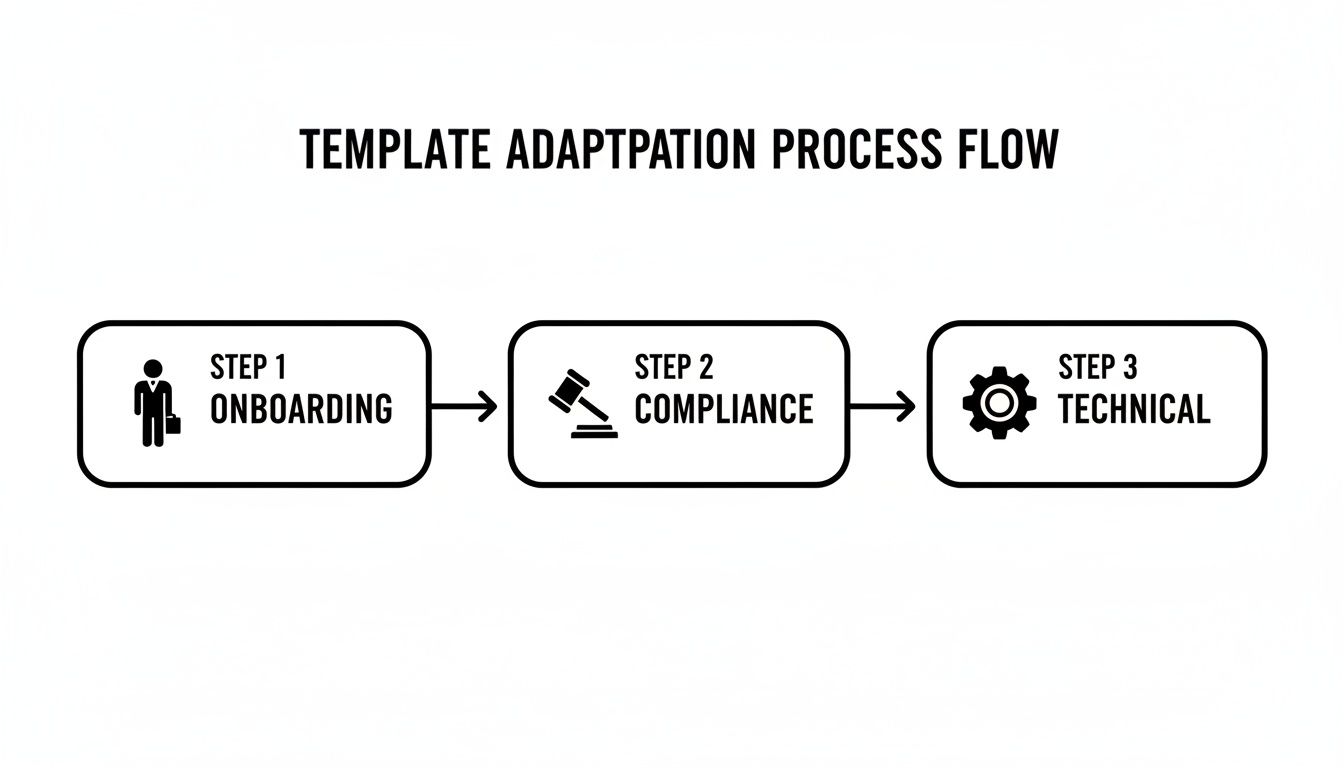
As you can see, a single master template provides the foundation, ensuring consistency across the board while allowing for specialized tracks. This saves an incredible amount of time.
Setting Up Assessments and Automation
Now for the "proof of learning" part. Your template's "Assessment & Evaluation Methods" section outlines how you'll test knowledge. A good LMS lets you build these checks directly into the course flow.
For example, our clients—ranging from agencies launching white-label platforms to companies managing compliance—can connect their templates to Mentor LMS's standalone exam system. It supports 7 different question types, handles auto-grading, and even issues certificates automatically. This is a game-changer for anyone looking to scale, whether you're a solopreneur or running a full-blown course marketplace, because it provides full ownership without nickel-and-diming you on revenue shares or per-student fees.
Then there’s the schedule. Your template's "Timeline & Schedule" can be fully automated with a drip content feature. If you designed a six-week program with new modules dropping every Monday, you just set it and forget it. The LMS handles the weekly content release, sending out notifications and keeping learners engaged without you having to manually intervene.
Measuring Success and Issuing Credentials
Finally, how do you know if it's all working? You look at the data. Your template's "Success Metrics / KPIs" become your dashboard. A quality LMS gives you direct, real-time insight into the metrics that matter most.
- Completion Rates: Who has finished the course, and who hasn't?
- Assessment Scores: Are learners passing the quizzes? Where are they struggling?
- Learner Progress: Can you spot where people tend to get stuck or lose momentum?
Once a learner hits all the right milestones—like completing all lessons and passing the final exam with an 80% or higher—the system can take over. The LMS can automatically generate and issue a branded, professional certificate. This provides that crucial validation and gives learners something tangible to show for their hard work.
Pro Tip: If you're creating highly interactive or technical content with specialized authoring tools, look for LMS support for standards like SCORM. It allows you to package your content and import it seamlessly, which can be a massive time-saver. To get up to speed, you can check out our guide on what a SCORM file is.
By systematically moving each component from your template into your LMS, you’re not just building a course. You’re building an automated, trackable, and scalable learning machine.
How to Manage Your Growing Template Library
As you build out more and more training, your collection of templates can go one of two ways. It can become your most powerful asset for efficiency, or it can turn into a chaotic digital junkyard where finding anything is impossible. Let's make sure it's the former.
Without a solid system, you'll inevitably end up using outdated versions, duplicating work, and creating inconsistencies that chip away at the quality of your programs.
The good news is that a reliable system for organizing your template library doesn't have to be complicated. I use a simple but effective version control system to avoid chaos. The real key is consistency. A logical structure keeps everything tidy and, more importantly, saves you from constantly reinventing the wheel.
Use a Smart Naming Convention
This is your first and best defense against file chaos. I can't stress this enough. A clear, consistent naming convention means anyone on your team can understand a template's purpose at a glance, without even opening it. It instantly tells you what it is, its version, and when it was last touched.
Here’s a simple but effective format I’ve used for years with corporate clients:Training_Program_Template_v2.3_Corporate_Onboarding_2026.docx
Let's break that down:
- Base Name: What is it? (Training_Program_Template)
- Version Number: Which iteration is this? (v2.3)
- Purpose: Who or what is it for? (Corporate_Onboarding)
- Year: When was it last updated? (2026)
This small habit makes searching for files infinitely easier and prevents the costly mistake of sending a client an old version.
Create a Logical Folder Structure
Once your file names are in order, they need a good home. A well-organized folder system in Google Drive is the next critical piece. The main goal here is to separate your master files from client-specific work to prevent anyone from accidentally editing your core templates.
Consider this straightforward structure:
- Main Folder: “Training Templates”
- Subfolder: “Master Templates” – This is where your pristine, untouched base templates live. Treat it like a vault.
- Subfolder: “Corporate Clients” – Houses customized versions for different clients or internal departments.
- Subfolder: “Customized Versions” – A general holding area for tailored templates.
- Subfolder: “Archived” – A clean place for old versions to retire gracefully.
This system means that when a new project starts, you simply grab a fresh copy from "Master Templates," customize it, and save the new version in the client's dedicated folder. It keeps everything clean and scalable, which is a lifesaver when you're managing multiple projects from an Mentor LMS admin dashboard and need to find things quickly.
Keep a Changelog and Build a Library of Reusable Blocks
Ever wonder what you actually changed between v2.1 and v2.2? That’s where a changelog comes in. Every template has a table at the top or in a separate “Changelog” tab that records what changed in each version (e.g., “v2.1 – Added mobile responsiveness section”). Think of it as your template's "version history"—it's invaluable for team collaboration.
To really speed things up, I also lean heavily on reusable blocks. I keep common sections (like objectives or evaluation checklists) as separate Google Docs or Notion blocks that I can copy-paste quickly. This not only saves hours but also ensures rock-solid consistency across all your programs.
This organized approach allows me to update a master template once and then easily roll out improvements to all customized versions without starting from scratch. It saves hours every time a new client comes in. If you’re looking to manage and expand your collection of program outlines, you can benefit from specialized intake form templates and tools.
Answering Your Top Questions About Training Program Templates
Once you start building and using your own training program templates, the real-world questions always start to pop up. You've got the basic structure down, but how does it all work in practice? We've gathered some of the most frequent questions I hear from L&D managers and instructional designers to give you some straight answers.
What’s the Difference Between a Course Outline and a Training Program Template?
People mix these up all the time, but the difference is critical. A course outline is just a table of contents for a single course. It tells you what will be taught by listing the topics and modules. That’s about it.
A training program template is on a completely different level. It’s the master blueprint for an entire initiative, answering the "why," "who," "how," and "what if."
A solid program template does so much more. It includes:
- Business Alignment: It kicks off with a purpose statement that ties the training directly to a business outcome, like "Reduce support ticket resolution time by 25%."
- Logistical Details: It outlines everything from delivery methods and key personnel to the resources you'll need to pull it off.
- Measurement Framework: This is huge. It defines the success metrics and KPIs for measuring real impact, which goes way beyond simple completion rates.
Here’s an easy way to think about it: the course outline is a single page of the blueprint. The training program template is the entire set of architectural plans for the whole building.
How Do I Customize a Template for a Corporate Client?
This is where the real value comes in. The template I customize most often for corporate clients is the Corporate Training Program Template. Corporate clients usually need something more structured than simple course outlines. This template works as the master blueprint for their employee training initiatives — whether it's onboarding, compliance, leadership development, or skills upgrading.
I start with a base version and then tailor it heavily based on the company's industry, team size, and specific goals.
The magic happens when you transform a generic document into something that feels completely bespoke. I’ll add their logo and brand colors, sure, but I also integrate their specific competency frameworks and map out learning paths based on roles within their company. The goal is to deliver a document that feels like it was created just for them, not pulled off a shelf.
The context changes everything. For example, a bank might need heavy compliance sections, while a tech startup focuses more on agile methodologies and hands-on projects.
What Are the Must-Have Sections in Every Template?
Over the years, I’ve found that ten core sections are essential for any template to be truly effective. Including these ensures that every plan you create is complete, measurable, and practical for everyone involved, from the training team to the C-suite. No more missed details.
These are my ten essentials that keep the template useful for both the training team and company stakeholders:
- Training Overview / Purpose — Why this program exists and how it aligns with business goals.
- Target Audience & Prerequisites — Who it’s for and what they need to know beforehand.
- Learning Objectives (written as SMART goals) — Clear, measurable outcomes.
- Program Structure / Curriculum Outline — Module-by-module breakdown with estimated time.
- Delivery Method — Self-paced, cohort-based, blended, or instructor-led.
- Assessment & Evaluation Methods — Quizzes, projects, practical assignments, and success metrics.
- Timeline & Schedule — Key milestones and overall duration.
- Resources & Materials Needed — Videos, worksheets, tools, or external links.
- Roles & Responsibilities — Who handles facilitation, support, and follow-up.
- Success Metrics / KPIs — How we’ll measure ROI (completion rate, performance improvement, etc.).
With these sections, you get a full 360-degree view of the program, from its high-level strategic goals all the way down to its day-to-day execution.
Ready to move from static documents to active, automated training? Mentor LMS gives you the tools to bring your templates to life, with a drag-and-drop curriculum builder, a robust exam system, and automated certificates.
Explore how Mentor LMS can bring your training programs to life.