
Software for Instructional Design: A Complete 2026 Guide
 Mahmudul Hasan Rafi·
We rebuilt a corporate cybersecurity course with the same learning goals, the same review process, and the same client expectations. The only major change was the software stack. Delivery dropped from nearly 6 weeks to 18 days because the team stopped stitching together manual slide workflows and started using tools built for course production.
That kind of gap is why software for instructional design matters so much. The right stack changes timelines, rework, maintenance, learner tracking, and total cost of ownership.
The Difference Between an 18-Day Project and a 6-Week Project
The cybersecurity project made the problem obvious. Before the team adopted a modern authoring workflow, they built modules in Google Slides, recorded voiceovers separately, then pushed everything through manual SCORM conversion. It worked, but every change request rippled through the whole build.

After the switch to Articulate Rise 360, the same style of course moved much faster. The team completed a 12-module cybersecurity awareness program in 18 days, instead of nearly 6 weeks. For their broader workflow, average development time for a 30-minute module dropped from 12 to 15 hours to 4 to 6 hours, and a 10-module course moved from 8 to 10 weeks down to 3 to 4 weeks. The content owner described that as roughly a 60% reduction in development time.
Where the time actually went
The gain didn't come from a magic template. It came from removing repeated labor:
- Responsive layout was automatic. The team no longer had to prepare separate mobile versions.
- Built-in interactions replaced manual assembly. Quizzes, accordions, scenarios, and knowledge checks were already available.
- SCORM export got simpler. Uploading into the LMS became a straightforward handoff instead of a cleanup project.
- Review cycles got shorter. Stakeholders reviewed something that already looked close to final.
Practical rule: Most project delays in eLearning don't come from writing content. They come from formatting, reformatting, exporting, fixing, and re-exporting.
What this changes for buyers
When people compare instructional design software, they often compare feature lists. That misses the true cost. A slower stack doesn't just delay launch. It burns production hours, increases QA mistakes, and makes small edits expensive.
The better question is simple: How much friction does this tool remove from your normal workflow?
For some teams, the answer is a cloud authoring tool plus a flexible LMS. For others, it's a lower-cost stack built from slides, voiceover, and lightweight interactions. Both can work. What doesn't work is buying software that looks impressive in a demo but creates extra handoffs every time you update a lesson.
What Is Instructional Design Software? The Four Core Categories
Think of software for instructional design like a professional kitchen. You don't run a kitchen with one appliance. You need different tools for prep, cooking, plating, and service. Instructional design works the same way.
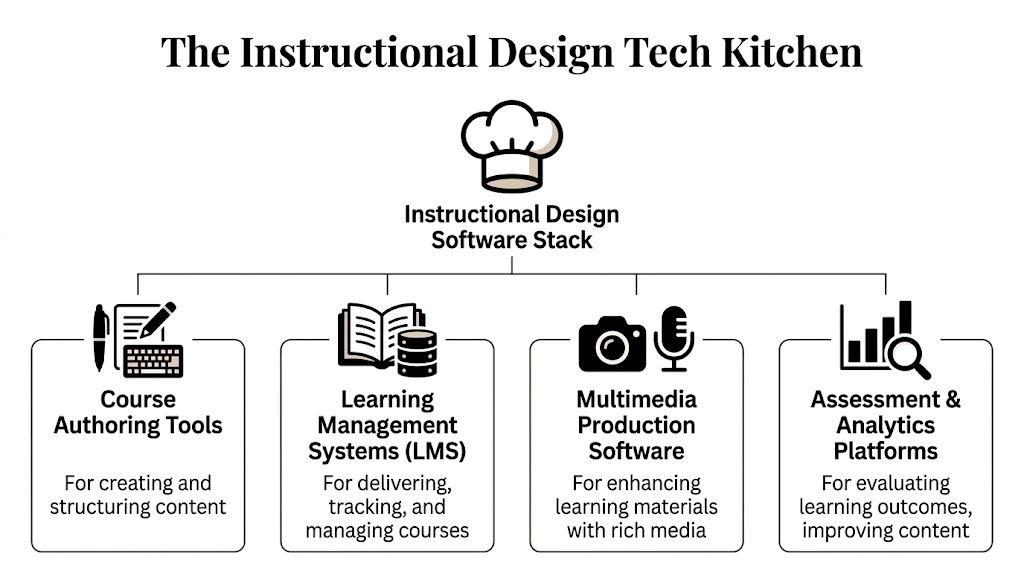
One tool creates content. Another delivers it. Another handles media. Another tells you whether learners understood anything. Confusion starts when teams expect one product to do all four jobs well.
Course authoring tools
These are the production tools. They're where you build lessons, scenarios, interactions, and SCORM packages.
Authoring tools decide how quickly your team can move from storyboard to working course. They also shape what kinds of learning experiences are realistic to build without custom development.
A few practical patterns show up again and again:
- Rapid responsive build: Tools like Rise 360 are good when speed matters and you want clean output across devices.
- PowerPoint-first conversion: Tools like iSpring Suite fit teams that already have solid presentation decks and need to turn them into eLearning without rebuilding from scratch.
- Low-cost flexibility: Google Slides plus recorded audio works for straightforward lessons when the goal is speed and simplicity, not advanced interactivity.
Learning management systems
The LMS is the service layer. It's where learners log in, launch courses, take exams, track progress, and receive certificates. It's also where administrators manage users, reporting, enrollment, and communications.
This category changed dramatically as instructional design moved from early computer-based training to web delivery. A brief history from ELB Learning notes that the field shifted in the 1980s with personal computers, and systems like PLATO introduced capabilities that still matter now, including text over graphics, answer-specific feedback, and keyword-based assessment (ELB Learning's history of instructional design).
Later in the same workflow, delivery became internet-based and then analytics-driven. That's why modern LMS decisions affect much more than hosting.
A quick visual helps place the stack before going deeper:
Multimedia production software
This category is often overlooked because people lump it into authoring. That's a mistake.
Multimedia tools handle the raw assets that make courses usable and credible:
- Audio editing for narration cleanup and exports
- Screen recording for demos and software training
- Image editing for diagrams, crops, and interface callouts
- Video editing for scenario clips and instructor-led segments
Audacity is a good example of a simple tool that earns its place. It doesn't try to be an LMS or an authoring suite. It just helps teams produce clean voiceover without extra cost.
Assessment and analytics platforms
Assessment can live inside the authoring tool, inside the LMS, or in a standalone exam engine. Which option works best depends on what you're measuring.
Use embedded quizzes when you need quick knowledge checks inside a lesson. Use LMS-level assessments when you need attempts, proctoring rules, grading control, or reporting across many courses.
Good instructional design software doesn't just publish content. It gives you a reliable way to see what learners did, where they struggled, and whether the course design needs revision.
Deep Dive I Creating Content with Authoring Tools and Assessment Engines
The authoring side of instructional design is where teams often overspend time without noticing it. They don't lose weeks in one big mistake. They lose them in dozens of small production choices, like rebuilding a layout for mobile, recreating a quiz, or manually syncing narration with slides after a script edit.
Choose the tool for the job, not for the logo
Teams often don't need one perfect authoring tool. They need a small set of tools with clear roles.
Articulate Rise 360 works best when speed, consistency, and responsive output matter more than deep simulation logic. That's why teams often use it for compliance, onboarding, product basics, and policy training. It produces polished modules quickly, and that speed compounds across multi-module builds.
iSpring Suite is the practical choice when your subject matter experts already live in PowerPoint. Instead of fighting that reality, iSpring turns the existing deck into a usable starting point. That's often the shortest path from workshop slides to a publishable eLearning module.
Google Slides plus Audacity still has a place. It's a lean workflow for internal training, simple explainer modules, and budget-sensitive projects. The trade-off is obvious. You gain flexibility and low cost, but you give up some built-in interactivity and production efficiency.
When Storyline earns its complexity
For scenario-based learning, software simulations, and branching logic, Storyline stays important. Devlin Peck's review notes that Articulate Storyline 360 is the most in-demand technical skill for instructional designers, supports complex branching through a variable-driven architecture without coding, and can deliver 85% faster development cycles compared to legacy tools (Devlin Peck's instructional design software review).
That matters when the course needs decision paths, conditional feedback, or realistic consequences.
Storyline isn't the fastest option for every build. It becomes worth it when the learning experience depends on learner choices, not just content sequence.
If the course only needs content blocks and simple checks, don't build it like a flight simulator.
Assessment engines should match the stakes
Assessment tools are often treated like an afterthought. They shouldn't be.
A low-stakes refresher can use inline quiz blocks inside an authoring tool. A certification pathway usually needs stronger controls at the LMS level, including attempt tracking, timers, question pools, and clearer reporting.
That distinction also affects maintenance. If every assessment rule lives inside the authoring file, even a small policy change may require republishing the whole course. If exams are managed separately, the team can update the assessment layer without touching the learning content.
A practical content workflow
A reliable authoring workflow usually looks like this:
- Start with the source material. Existing decks, SOPs, transcripts, and SME notes determine whether a slide-based or native authoring path will be faster.
- Pick the interaction level early. Simple content can stay in Rise or Slides. Decision-heavy learning may need Storyline.
- Plan media separately. Voiceover, screenshots, and visual assets should be produced on their own track, not improvised during assembly.
- Define assessment ownership. Decide what lives in the lesson and what belongs in the LMS before development starts.
- Export only after QA. A clean SCORM package saves headaches downstream.
If your team still gets tripped up on packaging and handoff, this plain-English explanation of a SCORM file is a useful refresher.
For teams building companion materials, a lightweight study guide creator can also help turn course content into learner-facing summaries without rebuilding everything manually.
Deep Dive II Delivering Courses with an LMS and Collaboration Tools
An LMS isn't just a place to upload files. It's the operating system for delivery. Once the course leaves the authoring tool, the LMS determines access, reporting, automation, permissions, learner experience, and often revenue flow.
That's why weak LMS decisions can undo good design work.
What the LMS actually controls
A delivery platform handles several jobs at once:
- Access and enrollment: Who sees which course, and when
- Tracking: Completion, quiz scores, time spent, progress state
- Automation: Emails, reminders, sequencing, drip release
- Credentialing: Certificates, marksheets, exam outcomes
- Administration: Roles for learners, instructors, and admins
The University of San Diego roundup notes that self-hosted learning management systems use embedded analytics to track learner interactions and that these automated interventions can improve retention by 35%. It also highlights SCORM/xAPI compliance, role-based dashboards, and flexible storage as major advantages of self-hosted systems (University of San Diego's instructional design software overview).
That combination matters because tracking without action isn't very useful. A good LMS doesn't just record learner behavior. It helps teams respond to it.
SaaS convenience versus platform control
This is the choice that shapes total cost of ownership more than any single authoring tool.
A SaaS LMS is usually easier to start with. Hosting, updates, and infrastructure are handled for you. For solo creators validating an idea, that's attractive.
A self-hosted LMS asks for more operational ownership. In return, you usually get greater control over branding, data, storage, business model, and integrations.
For people comparing the available options, this overview of the best platforms for selling online courses is useful because it frames the trade-offs across course businesses, not just feature lists.
If you need a baseline definition before comparing platforms, this guide to what is LMS is a practical starting point.
Collaboration tools are part of the stack, even if they never touch the learner
The best software for instructional design still fails when the team manages projects in email threads and scattered files.
Most production teams need separate collaboration tools for:
- Task management so review cycles don't disappear into chat
- Script and asset review so feedback stays attached to the right file
- Version control so the team knows which package is final
- SME communication so approvals happen on schedule
The fastest authoring tool in the world won't save a project that's waiting on untracked feedback from three stakeholders.
Collaboration software doesn't need to be fancy. It just needs to create clear ownership. Who writes. Who reviews. Who signs off. Who publishes. That's usually where project speed is won or lost.
How to Choose Your Software Stack A Decision Framework
Teams usually choose software for instructional design in the wrong order. They start with popularity. A better sequence starts with workflow, delivery model, and maintenance burden.
Five filters that matter before you buy
Use these questions first:
- Can it publish in a format your LMS supports? SCORM and xAPI compatibility still matter because content portability matters.
- Does it work well on phones without extra design effort? If mobile use is likely, responsive output isn't optional.
- Can your team maintain it? A powerful tool nobody wants to edit becomes expensive quickly.
- Does it support the assessment model you need? Embedded quizzes and high-stakes exams are not the same thing.
- What happens when you need to localize or adapt the experience? Many stacks look fine until translation, RTL support, or regional customization becomes necessary.
One often-missed issue is inclusion. EdTech Books notes a 42% increase in queries for "inclusive ID software" and argues that multilingual and RTL support are becoming more important, with self-hosted platforms often offering more flexibility than rigid SaaS tools for culturally sustaining design needs (EdTech Books on culturally sustaining instructional design).
That isn't a niche requirement anymore. If your learners span regions, languages, or cultural contexts, software flexibility affects completion and relevance.
SaaS versus self-hosted in practice
Here is the comparison I use with teams before they commit.
| Criterion | SaaS (e.g., Teachable, Thinkific) | Self-Hosted (e.g., Mentor LMS) |
|---|---|---|
| Setup speed | Faster to start, less technical work upfront | Slower at the beginning, more setup decisions |
| Total cost of ownership | Predictable subscription, but cost continues | Higher ownership responsibility, but stronger long-term control |
| Customization and branding | Usually limited to platform rules | Far more flexible if you need custom workflows or branding |
| Data ownership | Platform-controlled environment | Greater direct control over your data and infrastructure |
| Business model flexibility | Good for simple course selling | Better fit for marketplaces, client portals, and custom operations |
| Scalability approach | Convenient until platform limits matter | Better when you want control over hosting and growth decisions |
| Maintenance | Vendor handles updates and infrastructure | Your team or partner handles updates and hosting |
| Localization and inclusivity | Often constrained by vendor feature set | Usually easier to adapt for multilingual and RTL needs |
A simple decision rule
SaaS fits best when speed to launch matters more than long-term control.
Self-hosted fits best when you care about ownership, custom workflows, lower dependence on platform rules, and building an educational asset you can shape over time.
One more filter belongs in every buying conversation: your design philosophy. If your stack pushes you toward generic templates and one-size-fits-all content, it will eventually limit the quality of your work. This overview of instructional design principle is a useful reminder that tool choice should follow sound design, not replace it.
Putting It All Together The Mentor LMS Workflow
A solid workflow doesn't need to be complicated. It needs to be repeatable.
The most effective setups I've seen use a dedicated authoring tool for content production, a standard export format for portability, and an LMS that handles delivery, tracking, and business logic without forcing the team into awkward workarounds.
A clean build-to-delivery sequence
Start with the course in Articulate Rise 360 when the priority is fast production and responsive design. Build the lesson structure, insert knowledge checks, add scenarios where needed, and keep media organized outside the authoring file so updates stay manageable.
Then export a SCORM 1.2 package. That's the point where the content becomes portable. You aren't rebuilding the course for the platform. You're handing off a standardized package the LMS can track.
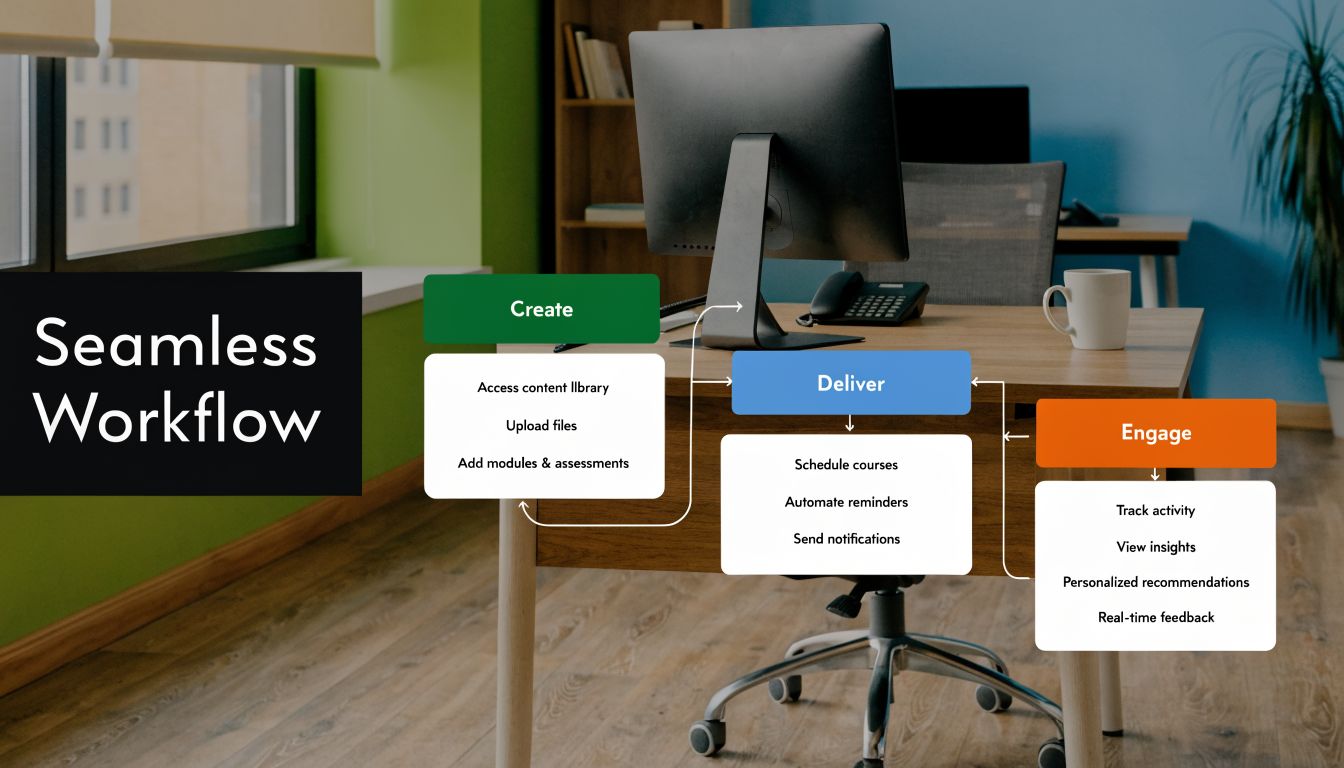
Upload that package into Mentor LMS as the delivery hub. From there, the platform handles learner access, progress tracking, course organization, and the surrounding experience that an authoring tool doesn't try to manage.
Where the LMS adds value after upload
This is the part new teams often underestimate. The course file is only one layer of the product.
Once the SCORM package is inside the LMS, you can shape the rest of the learner journey with platform-native features:
- Curriculum structure: Organize SCORM lessons with videos, documents, assignments, or live sessions
- Standalone exams: Keep formal testing separate when a course-level quiz isn't enough
- Certificates and marksheets: Issue credentials based on completion or exam results
- Drip scheduling: Release content over time instead of dumping everything at once
- Role-based views: Give admins, instructors, and students the right controls
That split is practical. The authoring tool creates the learning object. The LMS manages the learning operation.
Why structured workflows still matter
This isn't just about convenience. Structured design has a long history of producing better outcomes. Research summarized by EBSCO reports that systematically designed instructional courses achieved a 2:1 increase over conventionally designed courses in student achievement, reduced variance, and reduced time-to-completion, with performance improvement four times greater than a control group with no training (EBSCO's history of instructional design).
Modern software doesn't create good design by itself. What it does is make structured design easier to apply consistently.
Strong instructional design software supports the method. It doesn't replace the method.
Four real-world ways this workflow gets used
Solo creator
A solo course seller can author in Rise, export SCORM, upload to the LMS, and sell courses without giving up platform control. That setup works especially well when the creator wants their own brand, payment flow, and learner data.
Multi-instructor marketplace
Marketplace operators need more than a course player. They need instructor management, commissions, course approvals, and separate dashboards. That's where a self-hosted LMS can become the business backbone, not just the content library.
Agency delivery model
Agencies often need white-label flexibility. They build content in one set of tools, then deploy client-specific LMS instances with different branding, permissions, and business rules. A portable SCORM workflow keeps the content side consistent even when client environments vary.
Corporate or compliance training
Internal teams usually care about control, reporting, user roles, and security more than storefront design. The workflow fits because content authors can focus on course quality while the LMS handles enrollments, tracking, certificates, and exam records in-house.
What works and what doesn't
What works is separation of concerns. Let the authoring tool handle content production. Let the LMS handle delivery, tracking, and administration.
What doesn't work is forcing one platform to do every job badly. That's how teams end up with brittle courses, messy reporting, and expensive updates.
Conclusion Take Ownership of Your Educational Ecosystem
The best software for instructional design isn't the one with the longest feature list. It's the stack that helps your team produce strong learning experiences quickly, deliver them cleanly, and maintain them without constant friction.
The practical pattern is clear. Use the right authoring tool for the type of content you're building. Use an LMS that can track, automate, and scale delivery. Keep assessment strategy separate from content production when the stakes require it. And pay close attention to total cost of ownership, not just monthly convenience.
For many teams, the dividing line is control. SaaS tools are easy to start with. Self-hosted systems make more sense when you care about ownership, customization, and building a long-term training asset instead of renting access to one.
That's the bigger shift. You're not just choosing software. You're deciding who controls your content operation, your learner experience, your data, and your future flexibility.
Frequently Asked Questions
| Question | Answer |
|---|---|
| What software for instructional design do most teams need first? | Start with an authoring tool and an LMS. Without those two pieces, you can create content or host users, but not run a full learning workflow. Multimedia and collaboration tools come next. |
| Is an LMS the same as an authoring tool? | No. An authoring tool builds the course. An LMS delivers it, tracks learner progress, manages users, and handles reporting. Some platforms blur the lines, but they serve different jobs. |
| When should I use Rise 360 instead of Storyline 360? | Use Rise when you need fast, responsive course production and the interaction level is moderate. Use Storyline when the learning depends on branching, simulations, or variable-based logic. |
| Is Google Slides still a valid option for course creation? | Yes, for simple modules, low-cost projects, and internal training. It becomes less efficient when you need advanced interactivity, responsive design, or frequent revisions. |
| What is the biggest hidden cost in an instructional design stack? | Rework. Teams often underestimate the time lost to manual formatting, package cleanup, repeated exports, and fixing delivery issues between tools. |
| Should I choose SaaS or self-hosted for my LMS? | Choose SaaS if you need speed and low operational overhead. Choose self-hosted if you want more control over branding, data, workflows, and long-term platform ownership. |
| Can I migrate from a simpler setup later? | Usually yes, especially if your content is packaged in portable formats like SCORM. Migration gets harder when your content and delivery rules are tightly locked inside one vendor's system. |
| How important is multilingual or RTL support? | Very important if you serve global or diverse learner groups. It's much easier to plan for localization early than retrofit it after the platform is already live. |
If you want a platform you can own, Mentor LMS is worth a close look. It gives course creators, agencies, marketplaces, and training teams a self-hosted LMS built on Laravel and React, with no monthly fees, no vendor lock-in, and full control over branding, delivery, and scale. If you need something beyond the out-of-the-box setup, their team also offers custom LMS development for specific workflows, integrations, and white-label deployments.