
On Premise LMS: The Ultimate Guide to Self-Hosting (2026)
 Mahmudul Hasan Rafi·
You’re probably here because your LMS bill keeps showing up long after the excitement of launching your courses disappeared.
At first, a hosted platform felt easy. You signed up, uploaded lessons, connected a payment gateway, and started teaching. Then the friction started. A feature you need sits behind a higher plan. Your branding options feel boxed in. A growing student base makes the monthly cost sting more. If you run a marketplace, each sale can feel like someone else is taking rent from your business.
That’s the moment many course creators and training managers start looking at an on premise lms. Not because they want to become server engineers, but because they want ownership. They want the learning platform to behave like a business asset they control, not a storefront they borrow.
The Hidden Costs of Renting Your Online Business
A lot of founders reach the same point in the same way.
They launch on a SaaS LMS because speed matters. That makes sense. A hosted platform removes setup friction, and for a new creator, convenience can be worth paying for. But over time, convenience can turn into dependency. You keep paying, yet the platform still decides what you can customize, how your data moves, and which monetization rules apply.

That’s why I often explain the decision this way. A hosted LMS is like renting a retail shop in a busy commercial building. You can open quickly. The lights work. The doors are already installed. But the landlord sets the terms, raises the rent, limits the renovations, and can make your long-term costs hard to predict.
An on premise lms shifts that relationship. You own the setup. You’re responsible for it. But you also stop building somebody else’s asset while trying to grow your own.
Why ownership still matters
This isn’t a fringe idea. On-premises LMS deployment remains the dominant deployment model in 2025, holding the largest market revenue share globally, driven by organizations that need control, security, and customization, according to Grand View Research on the LMS market. The same analysis notes that large enterprises account for 30% of LMS market value and continue to favor on-premises deployments for mission-critical training.
That matters even if you’re not a large enterprise.
The same business pressures show up at smaller scales:
- Revenue pressure: Marketplace owners don't like giving up part of each sale.
- Feature pressure: Training teams don't want to wait for a vendor roadmap.
- Data pressure: Organizations need clarity on where learner records live.
- Brand pressure: Course businesses want their platform to look and behave like their brand.
Where readers usually misjudge the cost
Many buyers compare only the starting price.
They look at a monthly SaaS fee versus a self-hosted license and think the hosted option is automatically cheaper. That’s too narrow. A better question is what your platform really costs once you include growth, platform restrictions, integrations, and the price of staying dependent. If you want a deeper breakdown, this guide on the cost of LMS ownership is a useful companion to the decision.
Renting feels cheaper at the beginning because someone else carries the infrastructure. It can feel much more expensive later because you never stop paying for access to your own operation.
What an On Premise LMS Actually Is
An on premise lms is a learning management system that runs on infrastructure you control.
That infrastructure might be a physical server in your office. It might also be a virtual server from a hosting provider. The important point isn’t whether the machine is sitting in your building. The point is that you control the software environment, the data, the storage choices, and the update schedule.
The simplest way to understand it
A cloud LMS is like a furnished apartment.
You can move in fast. The kitchen is already there. Repairs are handled for you. But you can’t knock down walls, redesign the plumbing, or decide how the building operates. You live within the owner’s rules.
An on-premise LMS is like owning a house.
You’re responsible for maintenance. If something needs repair, it’s on you or your contractor. But you can remodel, add rooms, choose your own security system, and build equity in something you control.
That’s the trade-off in plain language.
What self-hosted means in practice
People often hear “self-hosted” and assume it means a server humming in a locked room with a full-time IT department nearby. That’s outdated thinking.
Today, self-hosted usually means one of these setups:
- A private server you manage yourself: Common for teams with internal technical support.
- A managed virtual server: Common for entrepreneurs who want ownership without handling every low-level task.
- A hosting partner environment: Common for agencies and training teams that want outside help with deployment but still want control of the application.
The software still belongs to your business model, not to a subscription vendor.
What changes operationally
When you move to an on premise lms, a few things become your responsibility:
| Area | What you control |
|---|---|
| Software | Installation, update timing, extensions, and custom code |
| Data | Storage location, backup policy, exports, and access rules |
| Branding | Design, learner experience, and workflow customization |
| Infrastructure | Performance, hosting environment, and scaling decisions |
That sounds intimidating at first, but not all of it has to land on your shoulders personally. Many businesses use managed hosting or outside developers for the technical layer while still keeping ownership of the platform.
Where people get confused
The biggest confusion is thinking on-premise equals complicated forever.
The better way to see it is this: the technical responsibility is more visible, but the business control is stronger. Modern self-hosted platforms are built to reduce setup friction, and many non-technical founders run them with outside support just as they would hire help for design, accounting, or paid ads.
If you can understand the difference between owning your storefront and renting one, you already understand the core idea behind self-hosting.
On Premise vs Cloud LMS A Detailed Comparison
There isn’t one universal winner. There’s only a better fit for the kind of business you’re building.
If you need speed, low setup effort, and vendor-managed maintenance, cloud can be the right move. If you need ownership, deep customization, and tighter control over costs as you grow, on premise can make more sense. A broader primer on cloud computing vs on-premise helps frame the infrastructure side of that decision.
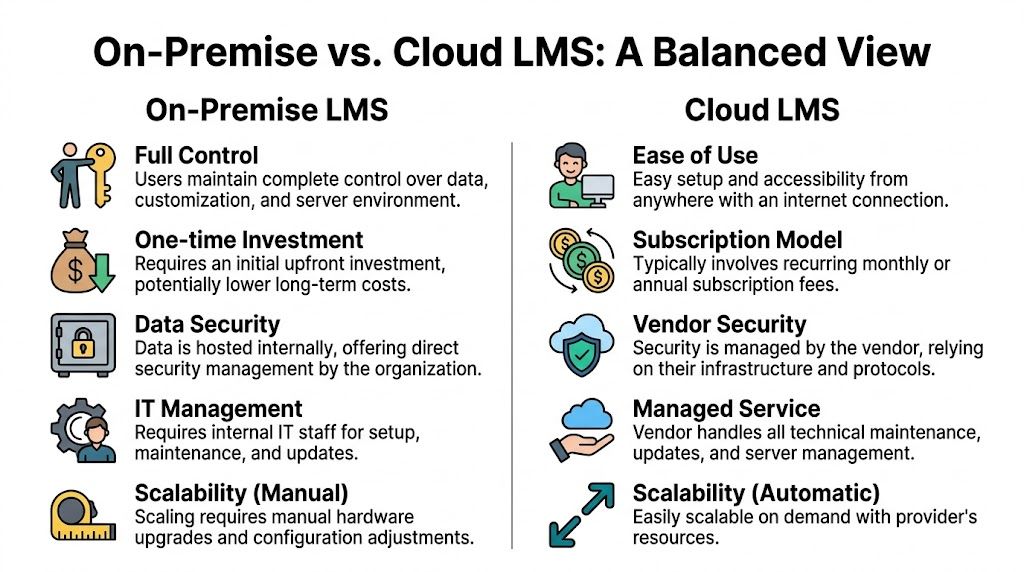
For a product-specific angle, this comparison of SaaS vs self-hosted LMS is also useful when you’re weighing platform models.
Cost model
Cloud LMS pricing is operational. You pay regularly, usually monthly or annually, and that predictability can help with short-term budgeting.
On-premise pricing is ownership-based. You pay more upfront for software and infrastructure, then carry maintenance and hosting on your side. That can feel heavier at first, especially if you’re still validating your offer.
The practical question is simple. Are you optimizing for low commitment now or lower dependence later?
Control and customization
Cloud systems are easier because they standardize the experience. That’s also the limitation.
If your business needs custom instructor workflows, unusual pricing logic, a specialized student dashboard, or a very specific brand experience, a hosted system can start to feel like a boxed template. Some platforms allow extensions, but they still define the boundaries.
On-premise gives you more room. You can tailor roles, flows, design, and integrations around your business instead of adapting your business to the platform.
Security and data privacy
This is a point where people often oversimplify.
Cloud doesn’t mean insecure. On-premise doesn’t automatically mean secure. The key difference is who holds responsibility and operational control.
With cloud, the vendor manages infrastructure security. Your trust shifts toward their policies, architecture, and update discipline.
With on-premise, your organization controls how the system is secured, where data is stored, and how access is managed. That’s attractive for teams with stricter internal requirements or compliance concerns.
Maintenance and updates
This is the clearest convenience gap.
Cloud vendors handle the server, patches, uptime work, and most platform updates. Your team focuses on content and administration.
On-premise puts maintenance back on your side. That includes backups, updates, monitoring, and testing changes before rollout. Some businesses see that as overhead. Others see it as operational freedom because they choose when changes happen instead of waking up to a vendor surprise.
Scalability
Cloud scaling is usually easier. When usage grows, the vendor absorbs most of the infrastructure complexity.
On-premise scaling is more hands-on. Growth can require server upgrades, storage planning, and performance tuning. You gain control, but you also inherit planning duties.
A side-by-side business view
| Decision area | On-premise LMS | Cloud LMS |
|---|---|---|
| Ownership | You control the environment and data | Vendor controls the platform environment |
| Budget shape | Higher upfront commitment | Lower upfront commitment |
| Customization depth | Broad freedom to modify workflows and branding | Usually limited to built-in options |
| Operations | Your team or contractor handles maintenance | Vendor handles maintenance |
| Scaling style | Planned and manual | More automatic and vendor-managed |
The practical filter
A cloud LMS usually fits when you want to launch quickly and keep technical work minimal.
An on premise lms usually fits when your platform is becoming part of your core business infrastructure, not just a tool you happen to rent.
Choose cloud when convenience is the priority. Choose on-premise when platform ownership affects margin, compliance, or the shape of your product.
The Business Case for Owning Your LMS
The strongest reason to self-host usually isn’t technical. It’s financial.
When your LMS sits at the center of your revenue or training operation, the long-term math changes. The monthly fee that felt harmless early on can become a drag on margin. The revenue share that seemed acceptable at launch can start to feel like a tax on growth.

According to Branch Boston’s comparison of cloud LMS and on-premise deployment, on-premise TCO can drop 20-30% below SaaS subscriptions after year three for high-volume users. The same source notes that one-time purchase models can eliminate vendor revenue shares of 5-20%, potentially saving over $50,000 in 5 years for SMEs compared with platforms like Teachable or Thinkific.
That doesn’t mean on-premise is cheaper for everyone on day one. It means there’s a tipping point. If you expect stable or growing volume, ownership can start behaving like a margin improvement strategy, not just a software preference.
The marketplace builder
This is the clearest case.
If you run a multi-instructor course marketplace, every platform fee cuts into a business model that already has moving parts: instructor payouts, promotions, payment processing, support, and content moderation. Giving up a slice of revenue on top of that can limit how aggressively you invest in growth.
For marketplace operators, self-hosting changes the economics. You keep control over the platform rules, commissions, and data relationships with both instructors and students.
The corporate training manager
Internal training teams usually think differently.
They care less about storefront design and more about governance, permissions, reporting, and system control. In healthcare, finance, manufacturing, and similar environments, local control can matter because training records, access policies, and audit expectations are tied to internal processes.
In that setting, an on premise lms isn’t about avoiding subscription fees alone. It’s about reducing friction between the LMS and the organization’s compliance posture.
The agency building client platforms
Agencies often get boxed in by SaaS limits.
A client asks for custom branding, a modified workflow, regional payment support, or role-specific behavior. If the platform can’t bend far enough, the agency ends up apologizing for limitations it didn’t create.
With self-hosted software, agencies can shape the platform around the client brief. That makes white-label work more durable because the agency isn’t waiting on a third-party roadmap to deliver what was promised.
The long-game edupreneur
Some creators aren’t trying to launch fast and flip to the next thing. They’re building a lasting education brand.
Those founders usually care about these questions:
- Can I keep my margins as enrollment grows?
- Can I structure my site my way?
- Can I own my student relationships and data?
- Can I avoid rebuilding the business if a vendor changes terms?
That’s where a self-hosted product like Mentor LMS becomes relevant. It’s a Laravel and React platform that supports solo course sites and multi-instructor marketplaces with self-hosted ownership, role-based dashboards, flexible storage, and built-in commerce tools.
A short demo helps make the ownership model more concrete:
A simple TCO lens
Instead of asking “What’s the cheapest LMS this month?”, ask:
- What will I pay repeatedly?
- What share of revenue leaves the platform?
- What happens when my student count rises?
- What would migration cost me later if I outgrow the vendor?
That’s a better ownership question.
A platform stops being “just software” when it starts shaping your margins, your operations, and your ability to change direction.
Your Technical Deployment Checklist
Individuals often get nervous here because they think deployment starts with jargon. It doesn’t. It starts with business capacity.
You’re deciding whether your team can support a system you control. That includes hardware planning, storage, backups, security, and integrations. None of that is mysterious once you translate each item into a practical question: what could break, what would it cost, and who would handle it?

Start with server capacity
For a mid-sized self-hosted LMS supporting about 500 users, organizations need at least an 8-core CPU, 32GB RAM, and 1TB+ SSD storage, with 64GB+ RAM recommended for peak loads, according to this hosting requirements breakdown. The same source cites Deloitte’s finding that on-premise systems can create a 47% higher IT workload, and recommends planning capacity for 12 to 18 months of growth to avoid disruptive upgrades.
That may sound like a lot if you’re new to infrastructure, so here’s the plain-English version:
- CPU is how much thinking power the server has.
- RAM is how much active work it can hold at once.
- SSD storage is where course files, media, and system data live.
If too many learners log in, stream content, submit tests, or generate reports at the same time, an underpowered server feels like a crowded checkout line. Everything slows down.
Choose a storage strategy early
Media grows faster than teams often expect.
Course videos, downloadable files, certificates, and backups all add weight. Keeping everything on one server is simple at first, but it can make future scaling clumsy. Many teams separate application hosting from media storage so they can expand more cleanly later.
A practical checklist looks like this:
- Core platform files: Keep these in a controlled server environment.
- Large media assets: Consider object storage if your library will grow heavily.
- Backup copies: Store them outside the live server environment.
- Restore testing: Don’t just create backups. Test whether they restore as intended.
Secure the basics before launch
Security doesn’t start with advanced tooling. It starts with disciplined setup.
Focus on these controls first:
- Access control: Give admins, instructors, and students only the permissions they need.
- Authentication: Use strong login policies and supported sign-in methods.
- Transport security: Make sure learner traffic uses secure connections.
- Update routine: Set a schedule so security patches don’t drift indefinitely.
Practical rule: If multiple people can “just log in as admin,” you don’t have a platform. You have a future incident.
Plan for backups and recovery
Every self-hosted LMS needs a recovery story.
If a plugin fails, a file is deleted, or a server issue appears, you need to know how quickly you can restore service and what data you might lose. That’s not just a technical question. It affects learner trust, support volume, and operational downtime.
Use this mental model:
| Scenario | Question to answer before launch |
|---|---|
| Server failure | Where is the latest restorable backup? |
| Bad update | Can you roll back safely? |
| Accidental deletion | How do you restore a course or file? |
| Data corruption | Who verifies data integrity after recovery? |
Map integrations before you install
A lot of self-hosted projects stall because the LMS is ready, but the surrounding systems aren’t.
Think about what must connect on day one. You may need payment gateways, email delivery, single sign-on, CRM syncing, HR records, reporting tools, or webinar systems. Each connection has business consequences. If user provisioning fails, onboarding fails. If email delivery breaks, learners miss access and certificate notices.
Before installation, document:
- Which systems exchange data with the LMS
- Which records are the source of truth
- How users authenticate
- What must happen in real time versus batch sync
If you’re evaluating product-specific prerequisites, the Mentor LMS installation requirements page is a useful example of the kind of environment checklist you should review before committing to any self-hosted platform.
A Framework for Implementation and Migration
The cleanest implementations don’t start with installation. They start with decisions.
Teams get into trouble when they treat an on premise lms like software first and a business project second. The healthier approach is to define goals, migration scope, system dependencies, and ownership before anyone uploads a file.
Phase one planning and discovery
Begin with the business case.
Are you trying to lower long-term software costs, support a marketplace model, improve compliance control, or build a white-label learning product for clients? The answer shapes everything from permissions to reporting to storage choices.
Then audit what you already have:
- Courses: Which content moves as-is, and which needs redesign?
- Users: Which learner records are active, outdated, or incomplete?
- Transactions: Which purchase or enrollment records matter operationally?
- Automations: Which emails, certificates, and rules must survive migration?
Phase two infrastructure and installation
Once the scope is clear, you can provision the environment and install the LMS.
This phase goes more smoothly when someone owns each operational area: hosting, security, application setup, email delivery, and testing. Even if one person handles multiple areas, name the owner. Vague responsibility causes more delays than the server itself.
Phase three migration and validation
Migration is rarely just import and done.
You’ll usually need to clean user data, standardize course assets, map categories, check enrollments, and verify whether learner progress can move cleanly. Some information transfers neatly. Some doesn’t. Set expectations early so stakeholders don’t assume every historical detail will appear in the new system exactly as before.
A migration worksheet should answer three things:
| Migration area | Question |
|---|---|
| Users | How will accounts be matched and authenticated? |
| Courses | Which file formats and lesson structures need adjustment? |
| Progress data | What learning history is critical to preserve? |
Phase four integrations and go-live
In such cases, timelines often stretch.
According to imc Learning Suite technical specifications, on-premise LMS platforms often need custom integration engineering for systems like HRIS or CRM, which can make deployment take 2 to 3 times longer than cloud alternatives because of API mapping, SSO or LDAP authentication work, and migration testing. The payoff is deeper personalization and stronger data governance.
That means your go-live plan should separate core launch requirements from phase-two integrations. If single sign-on and payroll-linked training records are business critical, treat them as launch blockers. If a lower-priority dashboard sync can wait, don’t let it hold up the entire project.
If your team is thinking beyond one environment and may later shift infrastructure models, a practical resource is this on-premises to cloud migration playbook, which helps frame migration planning from an operations angle.
Good LMS migrations are won in spreadsheets and test environments long before launch day.
Making the Final Decision An On Premise LMS FAQ
Is an on premise lms too technical for a solo creator without an IT team
Not always.
What matters is whether you can get dependable help for setup, updates, backups, and security. Some solo creators use managed hosting or a freelance technical partner and still gain the core benefit of self-hosting, which is ownership. If you’re comfortable outsourcing bookkeeping or design, outsourcing server management is the same kind of business decision.
The wrong move is assuming “self-hosted” means “do everything yourself.”
What is the true total cost in the first year
It depends on your stack and support model, so the honest answer is qualitative unless you price your exact setup.
Your first-year cost usually includes software licensing, hosting or server expense, domain and email setup, payment gateway configuration, branding work, and either your own time or outside technical help. If you need custom integrations, migration support, or enterprise authentication, the first-year cost rises because the project becomes more than a standard install.
The useful way to estimate cost is to split it into three buckets:
- Platform cost: software, hosting, storage
- Project cost: migration, setup, design, integrations
- Operating cost: maintenance, backups, support
How do I migrate students and courses from a SaaS platform
Start by exporting everything you can get cleanly: users, enrollments, course files, transactions, and any available progress records.
Then review the data before import. SaaS exports often contain mismatched fields, missing relationships, or structures that don’t line up neatly with a self-hosted LMS. The migration work is less about “moving files” and more about preserving the business logic behind those files.
If your learner records and purchase history matter, test a small batch first. Don’t do the full migration until you know what will map correctly and what needs manual cleanup.
Why choose a ready-made platform instead of building from scratch
Because software development isn’t just build cost. It’s maintenance cost, testing cost, update cost, and the cost of every future feature request.
A custom LMS can make sense if your business model is unusually specialized and you have the budget and patience to support an ongoing product development cycle. For most creators, agencies, and training teams, a ready-made self-hosted LMS gets them ownership without turning the business into a software company.
When does self-hosting make the most sense financially
Usually when one of these is true:
- Your learner volume is growing and likely to stay high
- Your platform takes direct payments and margins matter
- You run a marketplace and want to avoid sharing revenue
- You expect to use the same platform for years, not months
If your needs are temporary, simple, and speed matters more than long-term control, cloud can still be the better answer.
What’s the biggest mistake buyers make
They compare feature checklists and ignore operating model.
A platform isn’t just what it can do. It’s also how you pay for it, who controls it, how easily it adapts, and what happens when your business changes. That’s why the better question isn’t “Which LMS has more features?” It’s “Which model fits the kind of business I’m building?”
Conclusion Take Ownership of Your Teaching Business
An on premise lms isn’t only for giant enterprises with server rooms and dedicated IT departments. It’s a practical option for course creators, agencies, training managers, and marketplace owners who want more control over how their learning business runs.
The core trade-off is straightforward. Cloud platforms reduce operational responsibility, but they keep you inside a rented system. Self-hosting asks you to take more ownership, but it also gives you more control over cost structure, branding, data, and long-term flexibility.
For many buyers, the most important shift is financial. Once your platform becomes central to revenue, customer experience, or compliance operations, the TCO picture matters more than the monthly sticker price. That’s where self-hosting stops looking like a technical preference and starts looking like a business decision.
If you’ve outgrown platform limits, recurring fees, or revenue-sharing models, it may be time to stop renting the foundation of your teaching business and start owning it.
If you want to explore a self-hosted option in practical terms, take a look at Mentor LMS. You can review the product, see how its self-hosted model works for solo course sites or multi-instructor marketplaces, and decide whether owning your LMS fits the next stage of your business.