
Learning Management Systems Compare: Learning Management
 Mahmudul Hasan Rafi·
Most advice about LMS selection starts with feature checklists and monthly pricing. That sounds practical, but it leaves out the two questions that usually decide whether the platform still works for you in two years: what it really costs to operate and who controls the data, code, and customer relationship.
That gap matters because this isn’t a small software category anymore. The global LMS market is valued at USD 24.57 billion in 2024 and projected to reach USD 185.08 billion by 2035 at a CAGR of 20.15%, according to MetaTech Insights' LMS market analysis. When a market grows that fast, vendors multiply, pricing models get more creative, and surface-level comparisons get less useful.
A lot of buyers still choose based on the easiest demo. They see a polished SaaS dashboard, a low entry price, and a quick setup path. Then the actual costs arrive later through transaction fees, user caps, premium add-ons, branding limits, or painful export processes when they want to leave.
That’s why a serious learning management systems compare exercise can't stop at “which one has quizzes, certificates, and Zoom integration.” Nearly every mature LMS can cover the basics. A key difference sits in the business model behind the software.
Beyond the Monthly Fee Why Most LMS Comparisons Are Incomplete
Most LMS roundups are written as if all platforms should be judged the same way. They aren’t the same. A cloud subscription and a self-hosted platform may both let you publish courses, issue certificates, and track progress, but they create very different long-term obligations.

What most comparisons miss
A typical “top LMS” article focuses on:
- Visible features: course builder, quizzes, certificates, reports
- Ease of launch: how fast you can get a site online
- Monthly sticker price: the number that looks cheapest in a comparison grid
That approach helps with shortlisting, but it doesn't help much with ownership decisions.
If you're a solo creator, agency, academy, or training company, the harder questions come later. Can you export user data cleanly? Can you remove platform branding without upgrading? Can you add your own payment flow? Can you build a marketplace model without surrendering part of every sale? Can you move hosts if performance or compliance requirements change?
Practical rule: If an LMS comparison doesn't discuss total cost of ownership and data control, it's incomplete.
Cheap to start isn't the same as cheap to run
SaaS platforms often win the first-week comparison. They usually deploy faster, the vendor manages hosting, and the admin experience is simplified. That convenience is real. It also conditions buyers to ignore the contract logic underneath the product.
Once a course business starts growing, pricing mechanics matter more than launch speed. Subscription tiers, transaction fees, usage-based upgrades, and paid feature access can turn a simple software choice into an operating cost that rises alongside your success.
That’s the trap in most buying advice. It treats an LMS like a disposable app. In practice, an LMS becomes the operating system for your content, learner records, assessments, instructor workflows, and revenue collection. Replacing it later is never as simple as canceling a subscription.
A better way to compare
A useful learning management systems compare process should weigh three layers together:
| Comparison layer | What to check | Why it matters |
|---|---|---|
| Business model | Subscription, one-time license, revenue share, user-based pricing | Determines long-term cost pressure |
| Control | Data export, branding, hosting choice, code access | Determines how dependent you become on the vendor |
| Daily usability | Course building, exams, reporting, payments, certificates | Determines whether staff and learners can actually use it well |
The strongest buying decisions happen when those three layers line up. A platform that looks excellent in a demo but weak in cost control or ownership usually becomes expensive friction later.
The Fundamental Choice Renting vs Owning Your Platform
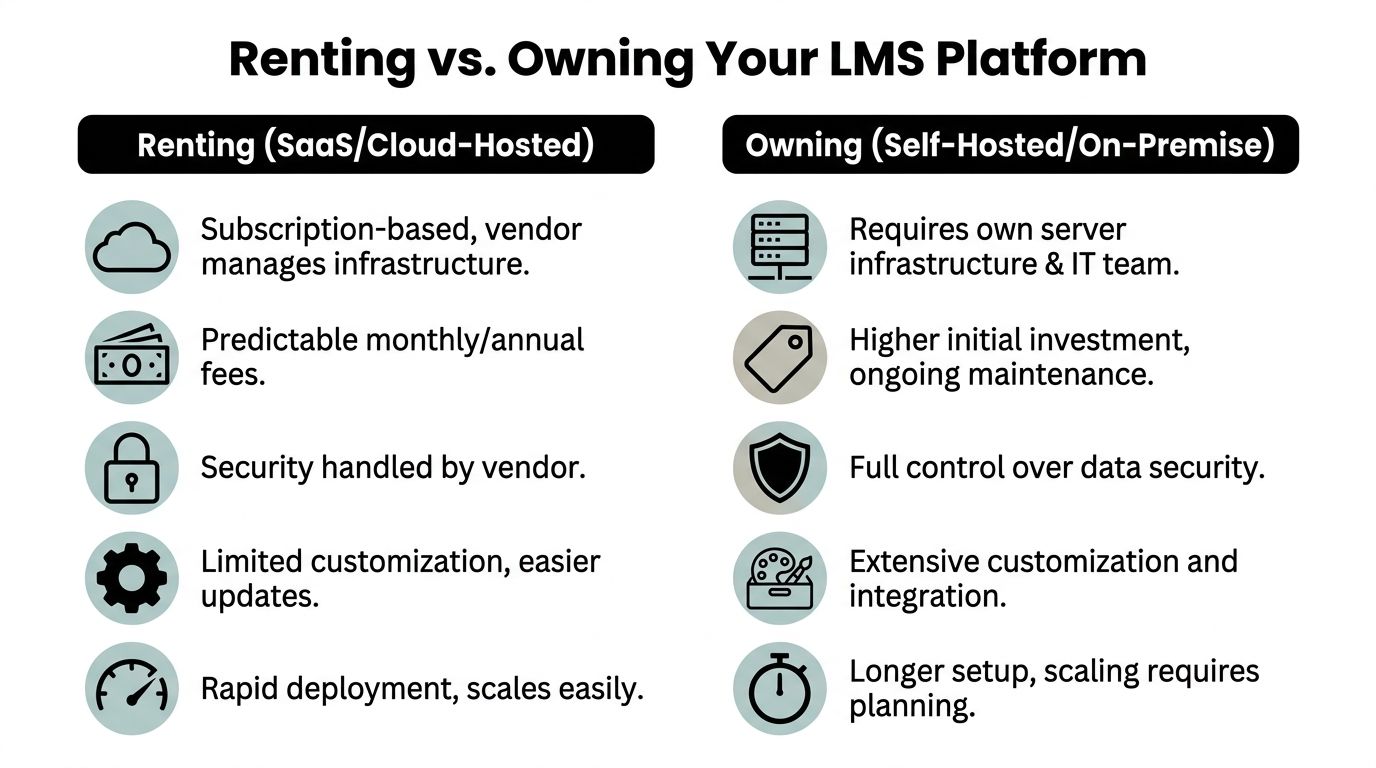
The simplest way to understand LMS buying is this. You're either renting the platform or owning the platform.
That distinction cuts through a lot of marketing noise. The product demos may look similar, but the consequences are different.
Renting through SaaS
With SaaS, you pay for access. The vendor hosts the application, handles infrastructure, rolls out updates, and gives you a managed environment. For many organizations, that's attractive for one reason. It reduces setup burden.
You don't need to think much about servers, deployment, backups, or patching on day one. That makes SaaS a reasonable fit for teams that want speed and don't expect unusual requirements.
The trade-off is structural. You're operating inside someone else's rules. Design freedom is narrower. Feature requests depend on the vendor roadmap. Data portability may be limited in practice even when exports technically exist. Pricing can change. Advanced branding and integrations often sit behind higher plans.
Canvas illustrates how powerful this model has become. The market is concentrated, with Canvas leading North America at 35% market share, according to EnsaanTech's LMS statistics and trends overview. That concentration matters because the dominant SaaS platforms influence how buyers think about pricing, packaging, and acceptable limitations.
Owning through self-hosted deployment
With self-hosted LMS software, you license or install the product on infrastructure you control. That can be your own server environment or a cloud stack you choose. The setup takes more planning, but the operating logic changes in your favor.
You decide where the platform runs. You decide how the data is stored. You decide when to customize, integrate, or migrate. If your use case changes, you're not waiting for a vendor to approve your business model.
That doesn't make self-hosting automatically better. It means the burden and the freedom move to you. Some teams want that. Some don't.
A useful breakdown of the differences appears in this guide on SaaS vs self-hosted LMS options, especially if you're weighing convenience against long-term control.
The real trade-offs
The apartment-versus-house analogy works because it captures the operational truth.
| Model | What you gain | What you give up |
|---|---|---|
| SaaS | Fast launch, vendor-managed infrastructure, simpler maintenance | Flexibility, cost predictability at scale, deeper ownership |
| Self-hosted | Full control, broader customization, hosting freedom, direct ownership | More setup responsibility, more planning, more implementation work |
Renting is easier when your needs are standard. Owning is safer when your business model is likely to evolve.
Where buyers misread the decision
Many teams assume they should start with SaaS and “upgrade” later. That can work. It can also create migration pain at the exact moment the business gains traction.
If you already know you'll need white-label delivery, multiple instructors, custom workflows, regional payment gateways, or full data control, choosing a restrictive platform first usually delays work rather than reducing it. The monthly fee looks smaller, but the switching cost gets larger.
That’s the point where learning management systems compare becomes less about shiny product pages and more about business architecture.
Core Feature Comparison What Really Matters
Once you get past the hosting model, the next question is simpler. Which features actually affect learner outcomes and operations, and which ones are just demo theater?
The answer isn't “more features.” It's better fit in the features you will use every week.
According to Absorb LMS' feature comparison overview, high-performing LMS platforms achieve course completion rates of 75-90% when they use capabilities such as SCORM/xAPI tracking, auto-grading exams with multiple question types, and drip content. That matters because it shifts the conversation away from decorative features and toward the mechanics that help learners finish.
Course building that supports real delivery
Most LMS platforms let you upload videos, add lesson text, and organize modules. That's table stakes.
The difference appears when you need to build for more than a simple one-instructor course. Some platforms lock you into rigid lesson templates and page layouts. That’s fine if your content is straightforward and your brand standards are loose. It becomes frustrating when you need more flexible curriculum structures, live class integration, downloadable resources, assignments, or staggered release schedules.
A stronger course builder should help with:
- Sequencing: drip content for timed release
- Content mix: video, audio, documents, assignments, live sessions
- Instructor workflow: easy edits without rebuilding the course structure
- Learner clarity: navigation that doesn't bury progress or next steps
If a platform looks polished but makes editing painful after launch, that polish wears off fast.
Exams and assessments that do more than check a box
Assessment quality is one of the fastest ways to separate serious LMS products from lightweight course platforms.
A lot of systems offer only basic quizzes. That may be enough for creator-led info products, but it's often weak for academies, test prep, compliance training, and internal workforce education. In those cases, teams need broader question formats, attempt controls, timed sessions, grading logic, and standalone exam delivery.
The practical questions I ask here are:
- Can the platform support exams outside the course flow?
- Can admins and instructors review attempts clearly?
- Can it auto-grade where appropriate without making the learner experience feel crude?
- Can the reporting surface weak areas by lesson, cohort, or question set?
When assessments are underpowered, teams end up using outside tools. That fragments the learner experience and weakens reporting.
If your training depends on proof of competence, don't buy an LMS with a “good enough” quiz tool. Buy one with a real assessment system.
Payments and monetization tools that don't punish growth
This area gets ignored in many LMS reviews because enterprise buyers don't always care about direct sales. Course businesses do.
If you sell courses publicly, monetization tools matter as much as the curriculum builder. You need payment gateways that serve your audience, coupon support, tax handling, bundle logic, and clean checkout flows. For multi-instructor marketplaces, you also need commission management and payout workflows.
What often goes wrong in SaaS platforms is not that payment support is missing. It's that monetization comes with restrictions. Revenue share, gateway limitations, or paid upgrades for basic selling features can make the business model worse as enrollments grow.
A useful comparison isn't “does it integrate with Stripe.” It's “who controls the transaction layer, who keeps the customer data, and who takes a cut.”
Certificates and branding that feel native
Certificates are easy to underestimate until a buyer needs them for credibility, completion records, or internal compliance evidence.
The same goes for branding. Many platforms advertise white-labeling, but the practical version may still leave traces of the vendor, restrict page control, or limit how much you can shape the learner journey. If you're selling under your own academy brand, that matters.
Points to examine:
| Feature area | Weak implementation | Strong implementation |
|---|---|---|
| Certificates | Generic templates, limited rules | Custom templates, automated issuance tied to completion logic |
| Branding | Logo swap only | Full control over pages, learner-facing design, and domain presence |
| Reports | Static exports | Filtered progress data, completion visibility, actionable dashboards |
| Engagement flow | All content unlocked at once | Drip paths, reminders, and progress-aware delivery |
What actually works in practice
The platforms that hold up over time usually share a few traits:
- They support structured learning, not just content hosting
- They let admins see what's happening without digging through menus
- They make monetization possible without constant plan upgrades
- They treat certificates, exams, and reporting as operating tools, not add-ons
What doesn't work is buying based on one impressive homepage demo and assuming everything else will sort itself out later. It rarely does.
The True Cost of an LMS Uncovering Hidden Fees and ROI
The monthly fee is often the least useful number in an LMS deal.
That sounds backwards, but it isn't. A low subscription price tells you very little unless you also know what happens when your enrollments grow, when you need core features that weren't included, and when you want to leave.

Why TCO matters more than entry price
A DevOpsSchool summary of LMS market comparisons cites a 2025 Capterra study showing that 87% of LMS users opt for cloud-based SaaS. The same source notes that public comparisons often fail to quantify total cost of ownership, even though self-hosted alternatives can eliminate vendor lock-in and platform revenue shares and save a business over $50,000 in 5 years.
That doesn't mean every self-hosted LMS is cheaper for every buyer. It means the common comparison method is shallow. Most reviews compare subscription plans as if the subscription is the whole cost.
It isn't.
The hidden fees buyers run into
In practice, the most common LMS cost traps are predictable:
- Transaction fees: the platform takes a cut of course sales
- Usage penalties: pricing rises with active learners or admins
- Feature tolls: certificates, reporting, or white-labeling require a higher plan
- Revenue-share friction: marketplaces lose margin on every sale
- Exit costs: migration becomes expensive when exports or customizations are limited
For a creator with modest enrollments, those costs may feel tolerable. For a training company or marketplace, they stack up fast.
If you're calculating carefully, compare all-in software spend against a realistic enrollment and revenue scenario over several years. A platform can look inexpensive at launch and still become the costliest option you evaluate.
For readers comparing numbers and pricing models in more detail, this breakdown of learning management system price considerations is the kind of analysis more buyers should do before signing anything.
A case that reflects the pattern
One training company in Bangladesh moved away from a SaaS platform after dealing with a monthly subscription and platform transaction fees. After switching to a self-hosted model, they removed platform fees and lowered the margin pressure on every enrollment.
The result wasn't just lower software spend. The business gained pricing flexibility. That matters because software fees don't only affect your back office. They affect what you can charge, what discounts you can offer, and how confidently you can scale.
The best ROI usually comes from removing recurring drag, not from chasing one extra feature.
A similar pattern shows up with clients who leave subscription platforms after realizing they’re paying repeatedly for capabilities they use every day, while still operating inside branding and customization limits.
ROI isn't only about software savings
There’s also an operating ROI that buyers often miss.
A platform with clean ownership can improve:
- Margin control: fewer deductions from each sale
- Forecasting: fewer surprise invoice jumps tied to growth
- Decision speed: custom changes don't require vendor approval
- Asset value: your course business sits on infrastructure you control
That’s why TCO should include more than software licensing. It should include implementation flexibility, upgrade path, control over monetization, and the cost of eventually switching.
A short explainer helps clarify how to think about these trade-offs before you commit:
The financial question worth asking
Before you choose an LMS, ask one question that most demos avoid:
What will this platform cost when the business is working, not when it is small?
That question usually reveals more than any feature tour.
Comparing Scalability Customization and Security
Some LMS decisions fail for a simple reason. The buyer chooses for launch, then suffers during growth.
Scalability, customization, and security are the three areas where that usually happens. They aren't abstract technical concerns. They shape whether the platform can support your business after the first round of courses goes live.
Reliability means different things in different models
Enterprise SaaS vendors often lead with infrastructure reliability. That's valid. According to Overt Software's 2025-2026 LMS comparison report, Blackboard Ultra offers 99.9% uptime on AWS. For institutions that want vendor-managed stability, that’s a serious advantage.
Self-hosted systems answer the same problem differently. Instead of promising vendor-managed uptime alone, they emphasize control over deployment, storage, updates, and scaling choices. For some organizations, reliability means “the vendor handles everything.” For others, it means “we can host, audit, back up, and adapt the platform without waiting on a third party.”
That distinction is especially relevant for buyers considering an on-premise LMS approach, where security and infrastructure policy may matter as much as interface design.
The practical side-by-side
The abstract trade-offs become clearer when you compare deployment and flexibility directly.
| Aspect | Mentor LMS (Self-hosted) | Typical Cloud SaaS (Teachable/Thinkific) |
|---|---|---|
| Deployment Time | 3 – 10 days | 1 – 3 days |
| Customization Effort | Medium (code-level possible) | Low (limited to templates & themes) |
| White-label / Branding | Full control | Partial (some restrictions remain) |
| Custom Feature Development | Possible (Laravel + React) | Usually not possible |
| Long-term Flexibility | Very High | Medium |
The main lesson from that table isn't that one side wins everything. It doesn't. SaaS is faster to launch. Self-hosted is more flexible once live.
Where scaling breaks first
Teams often don't hit a scaling problem because the site crashes. They hit it because the platform model stops fitting the business.
Common failure points look like this:
- A marketplace needs roles and commission logic the SaaS plan doesn't support
- A corporate team needs custom reports or permissions the vendor won't build
- An agency needs full white-label delivery but can't remove platform fingerprints
- A regional seller needs payment or hosting choices outside the vendor's default stack
Those aren't edge cases. They're normal growth events.
Security isn't only about who patches the server. It's also about who controls access, storage, exports, and platform dependency.
Customization is not a vanity feature
A lot of buyers underestimate customization because they think it only affects colors, logos, or homepage sections. In reality, customization affects workflows.
If your instructors need a different submission review flow, if your learners need a localized dashboard, if your admins need role-specific visibility, or if your sales process depends on a specific checkout experience, then customization becomes operational. It changes whether the LMS supports your process or forces your team to work around the software.
That’s why a serious learning management systems compare review should separate “easy to use now” from “adaptable later.” Those are not the same thing.
Which LMS Is Right for You Recommendations by Use Case
The right LMS depends less on vendor branding and more on the business you're trying to run.
A solo creator, a corporate trainer, and a web agency may all need course delivery. They don't need the same platform model.

Solo edupreneur
If you're launching one course brand and you care most about speed, a SaaS platform can still be the sensible choice. You get a quicker setup, less technical overhead, and fewer moving parts to manage alone.
But assess your future path. If you expect a modest catalog and don't need unusual branding, deep custom flows, or marketplace capabilities, convenience may be worth the limits. If you already know you want stronger ownership, direct control over margins, and hosting freedom, self-hosted becomes more attractive earlier.
Multi-instructor marketplace builder
Marketplace operators usually outgrow simple SaaS faster than they expect. Instructor roles, commissions, payout logic, branding control, and country-specific payment handling create pressure on the platform almost immediately.
A self-hosted option often makes more sense. One example is Mentor LMS, a self-hosted LMS built on Laravel and React that supports solo course sites and multi-instructor marketplaces, with drag-and-drop course creation, standalone exams, certificates, flexible storage, and payments in many countries through gateways such as Stripe, PayPal, and Razorpay. That kind of setup fits operators who want to own the platform rather than rent a constrained storefront.
Corporate trainer
Corporate teams usually need consistency, reporting, role control, and low admin friction. If internal IT resources are limited and procurement prefers a managed vendor, SaaS can be a clean fit. That's especially true when the training model is standardized and the organization values vendor-managed operations over customization.
Self-hosted becomes stronger when compliance, hosting policy, internal integrations, or data control carry more weight. In those cases, control isn't a luxury. It's part of the requirement.
Web agency or implementation partner
Agencies should think differently from end users. You're not just choosing software for one launch. You're choosing what kinds of client requests you can fulfill profitably.
A rigid SaaS tool may help on fast, low-customization projects. It becomes limiting when clients ask for white-label delivery, custom feature work, custom payments, or deeper branding. Agencies that want repeatable ownership and client-specific flexibility usually benefit more from self-hosted systems.
A useful rule for real buyers
The Bangladesh training company example captures the practical difference well. They moved away from a subscription model with platform fees because those fees were cutting into pricing flexibility and profit. Once the platform costs stopped taking a share, they could operate more directly.
That's the question to ask in your own case. Not “which LMS has more features,” but which model supports the business you plan to run next year.
Your Final Decision A Practical Checklist
By the time you're choosing between platforms, the feature lists usually look close enough. The smarter move is to pressure-test the decision with business questions that vendors often avoid.
Ask these before you sign
- What will the platform cost over several years: include subscriptions, upgrades, transaction fees, premium features, implementation, and migration risk.
- Who owns the data and how portable is it: ask what you can export, in what format, and how easy it is to leave.
- What happens when your business model changes: can you add instructors, sell exams, expand branding, or change the checkout flow without replacing the system?
- How much customization do you need: not just design changes, but workflows, reporting, permissions, and integrations.
- What does security mean in your context: vendor-managed simplicity, or direct control over hosting and storage.
- Are you buying for launch or for growth: those are different decisions, and many platform mistakes happen when buyers confuse them.
The simplest decision rule
Choose SaaS when speed, low setup burden, and managed infrastructure matter more than ownership.
Choose self-hosted when margin control, data sovereignty, customization, and long-term flexibility matter more than launch-day convenience.
Buyers rarely regret asking harder questions before purchase. They often regret not asking them.
If your answers point toward custom workflows or deeper ownership, it also helps to work with a provider that can support customized implementation, not just sell a license.
If you want an LMS you can own, host on your terms, and adapt over time, Mentor LMS is worth a look. It’s built for solo course creators, marketplaces, agencies, and training teams that want a self-hosted platform without recurring vendor lock-in.