
Learning Management System Price Unpacked (2026 Guide)
 Mahmudul Hasan Rafi·
You’re probably looking at two or three LMS quotes right now and thinking the vendors are selling completely different products. One quote is a neat monthly number. Another wants a sales call before showing anything useful. A third looks cheap until you notice onboarding, integrations, and support sitting outside the base plan.
That confusion isn’t your fault. LMS pricing is messy because vendors package the same core functions in wildly different ways, then bury the actual cost in tiers, usage limits, or implementation work. If you only compare the sticker price, you’ll buy the wrong system.
The smarter question is simple: what will this platform cost you over time? That means looking at the full learning management system price, not just the first invoice.
Why Is LMS Pricing So Confusing
A training manager gets a quote for a cloud LMS at a reasonable monthly rate. A course creator gets pitched a platform that sounds affordable until transaction limits and branding restrictions appear. An operations lead asks for a corporate LMS and gets a proposal that starts with software, then adds setup, support, and integration work later.
That’s how buyers get trapped. The number on the pricing page often has very little to do with the number finance approves in the end.
The confusion gets worse because this market is expanding fast. The global LMS market was valued at USD 28.58 billion in 2025 and is projected to reach USD 123.78 billion by 2033, with a projected 20.2% CAGR according to Grand View Research on LMS market growth. More vendors, more competition, and more pricing experiments usually mean one thing for buyers: less clarity.
What vendors want you to focus on
Most vendors steer the conversation toward the lowest visible number. That helps them win the demo. It doesn’t help you control cost.
Common distractions include:
- Low entry pricing: A starter plan looks harmless until you outgrow the user cap.
- Bundled language: “Enterprise-ready” often means key features are locked in higher tiers.
- Soft definitions: Terms like active user, premium support, or onboarding can mean very different things from one vendor to another.
The first LMS quote is rarely the real LMS price. It’s the opening bid.
What you should focus on instead
If you want a clean buying decision, stop asking “what’s the monthly fee?” and start asking:
- What triggers higher charges
- What work is billed separately
- What happens when users, courses, or admins increase
- How hard it is to leave later
That’s the only way to compare platforms accurately. Otherwise, you’re comparing marketing, not cost.
The Two Worlds of LMS Pricing SaaS vs Self-Hosted
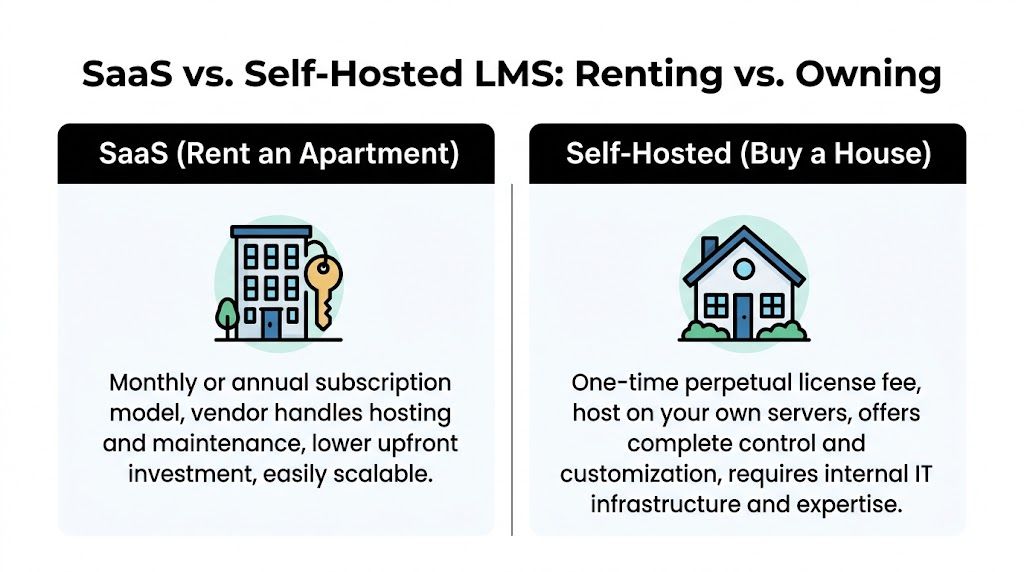
There are really only two financial models in this market. You either rent the platform or own the platform.
SaaS is renting an apartment. You move in quickly, the landlord handles building maintenance, and you keep paying as long as you stay. Self-hosted is buying a house. You pay upfront, you control the property, and you decide how it runs.
That distinction matters more than feature lists. It changes your cost structure, your flexibility, and your advantage.
What SaaS gets right
Cloud LMS platforms are popular for obvious reasons. They’re easy to start, the vendor handles hosting, and the upfront commitment is lighter. Many guides focus on SaaS pricing in the $50 to $5,000+ per month range, but they often miss the long-term return of one-time purchase models, as noted in this LMS pricing gap analysis from Disprz.
SaaS usually works best when you want:
- Fast setup: You don’t want to think about servers or deployment.
- Vendor-managed maintenance: Updates, uptime, and routine operations sit with the provider.
- Simple procurement: Finance can approve operating expense more easily than an owned software asset.
That convenience is real. So is the tradeoff.
Where SaaS starts to hurt
Renting software creates recurring dependence. Your bill doesn’t stop. Your platform limits don’t disappear. And your roadmap is tied to a vendor whose business model depends on keeping you subscribed.
The pain points show up in familiar ways:
- Scaling fees: More learners often means higher monthly cost.
- Feature gating: APIs, white-labeling, reporting, and ecommerce are often tied to expensive plans.
- Vendor lock-in: Leaving later can be messy because your workflows, content, and history live inside someone else’s system.
Practical rule: If your LMS is core infrastructure, renting forever is usually the expensive path.
Why self-hosted deserves more attention
Self-hosted LMS software flips the model. You buy the platform, host it yourself or with a cloud provider, and control the environment. That means the learning management system price shifts from recurring software rent to ownership plus hosting and maintenance.
For the right buyer, that’s a much better deal.
Self-hosted works well when you care about:
- Cost control over multiple years
- Customization without vendor approval
- No platform revenue share
- Freedom to choose hosting and payment tools
- Long-term ownership of code and data
A modern example is self-hosted versus SaaS LMS buying models, where the financial difference becomes obvious once recurring subscriptions are compared against ownership.
SaaS vs Self-Hosted at a glance
| Factor | SaaS LMS (e.g., Teachable, Kajabi) | Self-Hosted LMS (e.g., Mentor LMS) |
|---|---|---|
| Cost structure | Recurring monthly or annual fees | One-time license plus hosting |
| Ownership | Vendor-controlled | Buyer-controlled |
| Updates | Managed by vendor | Managed by your team or host |
| Customization | Limited by plan and roadmap | Broad control over code and setup |
| Scaling | Often tied to user or feature tiers | More flexible, depends on hosting setup |
| Exit risk | Higher, because migration can be painful | Lower, because you own the system |
| Revenue share risk | Can apply on some creator platforms | Avoidable |
My recommendation
If you need a lightweight training portal for a short-term use case, SaaS is fine. If you’re building a serious education business, internal training hub, or marketplace, ownership is the stronger strategy. The market talks endlessly about monthly plans because subscriptions are easier to sell. Buyers should care more about control and total spend.
Decoding Common SaaS Pricing Models
Once you decide to rent instead of own, you still need to decode how the landlord charges you. SaaS LMS vendors use a few standard pricing models, but buyers keep mixing them up and then wonder why their invoices spike.
The structure matters as much as the rate.
Pay per user
This is the simplest model. You pay for every learner account, whether that person uses the platform or not. It’s predictable, and that’s why finance teams often like it.
It also wastes money when adoption is uneven. If your training is mandatory and usage is stable, this model can work. If half your people log in twice a year, it becomes dead spend.
Pay per active user
This model sounds smarter, and sometimes it is. You only pay for users who meet the vendor’s definition of “active” during the billing cycle.
The issue is scale. According to 360Learning’s pricing breakdown for active-user LMS models, pay-per-active-user pricing commonly runs from $5 to $15 per user per month. The same source notes that moving from 100 to 500 users can push annual cost from roughly $12,000 to over $60,000.
That’s why this model catches buyers off guard.
- Good fit: Seasonal training, partner education, campaign-based learning
- Bad fit: Fast-growing programs where usage can jump suddenly
- Main risk: Budget volatility
Flat-rate and tiered plans
This is the “simple” option vendors love to advertise. You pay a platform fee for a band of users or feature access. Once you cross the band, you jump to the next tier.
That sounds neat until you need one feature from the next plan and inherit a much bigger bill.
Here’s how to read these plans properly:
| Model | What it feels like | Main advantage | Main risk |
|---|---|---|---|
| Per user | Paying for every seat in a room | Easy to forecast | Inactive users still cost money |
| Per active user | Paying only for attendees who show up | Better for fluctuating use | Bills can swing fast |
| Tiered flat rate | Renting a package with caps | Simple on paper | Feature and usage cliffs |
If you want a useful mental model, treat LMS billing the same way you’d approach infrastructure spend. This guide to decoding cloud hosting pricing models is worth reading because the logic is similar. Small usage assumptions can turn into expensive surprises once growth, storage, and service tiers kick in.
My blunt advice
Don’t choose a SaaS pricing model because it looks affordable this quarter. Choose it based on how you expect usage to behave over the next few years. If the platform charges by growth, success becomes a penalty.
The Hidden Costs That Inflate Your LMS Price
Most buyers underestimate LMS cost because they focus on the platform fee and ignore everything wrapped around it. That’s like pricing a car based only on the steering wheel.
The better metaphor is an iceberg. The subscription sits above water. The expensive part sits below it.

For enterprise LMS, hidden costs can inflate the base price by 40 to 60 percent. Implementation alone can cost $10,000 to $40,000, and custom integrations can add $5,000 to $25,000, turning a $60,000 annual subscription into $110,000+, based on this enterprise LMS pricing analysis from People Managing People.
That’s not a fringe scenario. It’s standard procurement reality.
The big cost buckets buyers miss
A vendor quote usually hides several extra layers. Some are legitimate. Some are pricing theater.
- Implementation work: Platform setup, admin configuration, workflow mapping, and launch support.
- Integrations: HRIS, SSO, reporting tools, payment systems, webinar platforms, and content connectors.
- Data migration: User records, completion history, certificates, and course imports.
- Premium support: Faster response times, dedicated contacts, and service expectations that should have been included.
- Compliance customization: Audit workflows, certification logic, and reporting add-ons.
- Third-party tools: Ecommerce, tax handling, forms, content libraries, and storage extras.
Why implementation fees become a trap
Implementation sounds reasonable until you inspect the scope. Some vendors treat basic setup like a consulting engagement. You’re not just paying for software. You’re paying the vendor to make its own product usable in your environment.
That becomes especially painful for mid-market buyers. Large enterprises can amortize these costs across big teams. Smaller organizations just absorb the hit.
Buyers rarely get burned by the listed LMS price. They get burned by the work required to make the LMS functional.
Integrations are where budgets slip
“Enterprise-ready” often translates into expensive custom work. A platform may connect to SSO but charge extra for setup. It may support HRIS sync but only through a partner. It may promise reporting exports but put API access in a premium tier.
That’s why vague language is dangerous. “Supports integration” doesn’t mean “integration is included.”
Before you sign anything, ask for line-item answers on:
- SSO setup
- HR or payroll sync
- CRM connection
- Zoom or live class tools
- Certificate workflows
- Payment gateway setup
- Data export if you leave
Support is often a disguised upsell
A lot of LMS vendors bundle mediocre support into the base plan, then charge more for the level of responsiveness most businesses need. If your platform handles onboarding, compliance, or customer training, slow support becomes a business problem fast.
This short overview is useful if you want a visual reminder of where software costs usually spread after purchase:
The TCO lens you should use
Use this simple framework when reviewing any LMS proposal:
| Cost layer | Usually visible upfront | Often hidden until later |
|---|---|---|
| Subscription or license | Yes | No |
| Setup and onboarding | Sometimes | Often |
| Integrations | Rarely clear | Yes |
| Migration | Rarely clear | Yes |
| Support tiers | Partly | Yes |
| Add-on modules | Sometimes | Often |
My recommendation
Ask every vendor for the full three-part number:
- Base platform cost
- Launch cost
- Ongoing cost after launch
If they resist that breakdown, move on. A transparent vendor can answer it quickly. An evasive one is telling you exactly how the relationship will go.
Real-World Scenarios A 3-Year Cost Analysis
Abstract pricing discussions don’t help much when you’re trying to choose a platform. Buyers need to see how costs behave in real situations.
These three examples show how the learning management system price changes depending on who’s buying, how they grow, and how much flexibility they need.

Scenario one for the solo course creator
A solo creator usually starts by choosing convenience. A hosted platform gets them online quickly, and that’s fine at the beginning. The problem starts when branding limits, transaction rules, or higher feature tiers appear.
Over three years, the key question isn’t “can I launch cheaply?” It’s “am I building on rented land?” If the creator wants control over checkout, content structure, design, or instructor expansion later, the hosted shortcut often becomes expensive in practice.
A self-hosted system changes that equation because the creator can control the storefront, data, and growth path without tying everything to one platform’s plan logic.
Scenario two for the mid-sized company
Cost discipline is of utmost importance. A mid-sized company with 250 to 500 employees can expect to budget $15,000 to $80,000 annually for a SaaS LMS subscription alone, before implementation and integration costs add more, according to this mid-market LMS budgeting guide and the earlier market pricing benchmark.
That range is so wide because the software fee is only one layer. The moment a company needs SSO, compliance reporting, structured onboarding, or manager dashboards, the proposal expands.
Here’s what a decision usually looks like over three years:
| Buyer type | Typical SaaS pattern over 3 years | Self-hosted pattern over 3 years |
|---|---|---|
| Solo creator | Lower entry cost, rising platform dependency | Higher initial setup effort, stronger long-term control |
| Mid-sized company | Recurring subscription plus rollout costs and added services | Upfront software decision plus hosting and internal ownership |
| Marketplace operator | Growth triggers more plan pressure and platform limitations | More operational responsibility, but better flexibility for scale |
Scenario three for the marketplace entrepreneur
A marketplace operator has different pressure points. They need instructor management, payouts, ecommerce controls, student communication, and the freedom to shape the business model without a vendor dictating the experience.
One-time purchase software thus becomes strategically attractive. A self-hosted platform such as Mentor LMS supports solo course sites and multi-instructor marketplaces with source-code ownership, configurable commissions, multiple payment gateways, and self-managed hosting. That matters because marketplaces evolve. They rarely stay simple.
If you expect your LMS to become a business asset, ownership usually beats convenience within a few years.
What the 3-year view changes
Short-term buyers compare first-year affordability. Experienced buyers compare lock-in, upgrade pressure, and operational control over multiple years.
A realistic three-year review should cover:
- Software cost
- Setup and migration effort
- Hosting
- Support
- Integration work
- Limits that force plan upgrades
- Exit complexity
The decision lens I use with clients
I tell clients to sort themselves into one of three buckets:
- Temporary need: Choose convenience, accept the subscription.
- Stable internal training use: Compare TCO carefully, not monthly pricing.
- Growth or monetization use case: Favor ownership unless there’s a clear reason not to.
That approach cuts through most LMS sales noise.
Your Smart Buyer's Checklist for Choosing an LMS
Most LMS demos are controlled by the vendor. That’s a mistake. You should control the conversation.
A good buyer doesn’t ask “what can your platform do?” A good buyer asks “what will this cost when we use it the way we need to?” That’s how you stop vague answers and get to real terms.

The questions that expose real cost
Bring this list to every vendor call.
- User limits: How are users counted, and what triggers an upgrade?
- Course and storage limits: Are there caps on courses, video storage, or file delivery?
- Support scope: What does standard support include, and what costs extra?
- Integration access: Is API access included, or is it locked behind a higher plan?
- Branding control: Does white-labeling cost extra?
- Commerce rules: Are there transaction fees, revenue shares, or payment restrictions?
- Export rights: Can you export users, completions, and course data without penalty?
- Renewal terms: What happens to pricing at renewal time?
The questions buyers forget to ask
These are the ones that matter later:
| Question | Why it matters |
|---|---|
| What counts as an active user? | Vague definitions create billing surprises |
| What setup work is excluded? | Exclusions become invoices |
| Which features require higher tiers? | Feature gating distorts comparisons |
| What does migration out look like? | Exit cost is part of purchase cost |
Buyer test: If a vendor can’t explain pricing in plain language, don’t assume the contract will become clearer later.
My recommendation
Force every proposal into the same format. Ask each vendor to separate base fee, implementation, integrations, support, and renewal assumptions. Once you normalize the quotes, the expensive option often becomes obvious. The cheapest-looking one usually isn’t the cheapest.
How to Minimize Costs and Maximize Your LMS ROI
Most organizations don’t overspend because they chose the wrong category of software. They overspend because they buy too much platform, accept vague contracts, and ignore operating discipline after launch.
You can avoid most of that.
Start with the right cost structure
If your training program is central to your business, stop treating the LMS like a disposable app subscription. A self-hosted model often gives better long-term control because your spend shifts toward infrastructure you manage instead of recurring software rent.
If you’re evaluating that route, this guide to a self-hosted learning management system approach is a useful starting point for thinking through ownership, deployment, and operational fit.
Cut waste before you buy
A few practical moves reduce cost immediately:
- Match the platform to the use case: Don’t buy enterprise complexity for simple course delivery.
- Refuse vague implementation scopes: If setup isn’t defined, assume it will expand.
- Avoid paying for dormant features: Fancy analytics and add-ons sound useful. Many teams barely use them.
- Choose flexible infrastructure: With self-hosted systems, your hosting can scale with actual need instead of vendor packaging.
For broader budgeting discipline, these essential cost-cutting strategies are worth applying to software procurement too. The principle is the same. Remove recurring waste before it becomes operational habit.
Define ROI correctly
A lot of buyers measure LMS ROI too narrowly. Revenue matters for course sellers, but operational return matters just as much for companies and academies.
A better ROI discussion includes:
- Less admin work
- Fewer manual training tasks
- Faster onboarding
- Better control over compliance records
- Stronger ownership of learner and course data
- Lower switching risk later
My direct view
The strongest ROI usually comes from buying a platform that fits your future model, not your current comfort level. If you know the LMS will become part of your business infrastructure, own more of the stack earlier. That gives you room to customize, reduce recurring spend, and avoid the usual subscription creep.
Frequently Asked Questions on LMS Pricing
Can you switch from a SaaS LMS to a self-hosted LMS later
Yes, but don’t assume it will be easy. The hard part isn’t exporting a CSV. The hard part is preserving completion history, course structures, certificates, user roles, and the workflows your team built around the old platform. If you think ownership may matter later, ask about export formats before you sign the SaaS contract.
What is a realistic monthly hosting cost for a self-hosted LMS
It depends on traffic, media delivery, course volume, and whether you host video locally or use external storage. The right way to budget is qualitatively: start small, monitor usage, and scale infrastructure only when learner activity requires it. That cost is usually easier to control than a SaaS bill that rises with users and features.
Are free LMS options worth considering
Sometimes, but “free” usually means unsupported. Open-source tools can work if you already have technical capacity and you’re comfortable handling hosting, updates, security, and plugin management. If you don’t have that capacity, free software can become expensive labor.
Is a one-time purchase LMS always the better option
No. If you need a platform fast, have minimal customization needs, and don’t mind recurring fees, SaaS can be the practical choice. But if you care about ownership, flexibility, and long-term cost control, a one-time purchase model is often the smarter financial decision.
What’s the biggest mistake buyers make with learning management system price
They compare subscription numbers without comparing total cost of ownership. That’s how they miss implementation fees, integrations, support upgrades, and the cost of being stuck later.
If you want an LMS you can own instead of rent, take a serious look at Mentor LMS. It’s a self-hosted platform built for solo course sites, multi-instructor marketplaces, agencies, and corporate training teams that want full control without monthly software fees or vendor lock-in.