
Best LMS for Small Business: 2026 Guide
 Mahmudul Hasan Rafi·
Most advice about the best lms for small business starts with the monthly price. That's the wrong place to start.
A small business rarely fails with training software because the login screen was ugly or because a competitor had one more AI feature. It fails because the owner bought a pricing model that looked cheap in month one, then became restrictive as the team, course catalog, or client base grew. A platform can be easy to launch and still be expensive to live with.
That’s why I tell owners to evaluate LMS software like any other business asset. Ask what it will cost to run, what happens when you need more users, whether your brand can stay front and center, and how hard it will be to leave if the vendor no longer fits. Those answers matter more than a flashy feature grid.
Here’s the quick comparison I use early in LMS evaluations:
| LMS path | Best fit | Main advantage | Main trade-off |
|---|---|---|---|
| SaaS LMS | Small teams that want the fastest launch with minimal IT work | Quick setup, managed hosting, vendor support | Ongoing subscription costs, tier limits, feature paywalls |
| Self-hosted LMS | Businesses that want control, branding, and long-term cost predictability | Ownership, customization, no recurring platform fee | You need hosting and some setup support |
| Enterprise LMS | Larger organizations with complex compliance or multi-audience training | Advanced workflows, analytics, and integrations | Higher cost, heavier admin load, often too much for small teams |
The Hidden Costs of Choosing an LMS
Cheap LMS pricing often creates expensive LMS decisions.
Small business owners get pulled toward the lowest monthly plan because it feels reversible. Low commitment, fast setup, no big capital expense. On paper, that looks prudent. In practice, it often means buying into a pricing structure that gets more expensive the moment training starts doing its job.
The hidden cost is not the subscription itself. It is the gap between what the starter plan promises and what a growing business needs six or twelve months later. A team adds new hires, starts training clients, needs cleaner reporting for managers, or wants its own branding on certificates and login pages. Those are normal milestones, not edge cases. On many SaaS LMS platforms, each one pushes the account into a higher tier.
That is why I advise owners to price the future version of their business, not the current one.
What usually drives the real cost
Starter plans are built to get a small team in the door. They are rarely built to stay economical as the program expands. The penalties show up in places owners do not see during the free trial.
Common examples include:
- User or active learner caps: Growth increases the bill, even if the course library stays the same
- Admin limits: A second manager, trainer, or client contact may require a pricier plan
- Branding restrictions: Custom domains, white-labeling, and branded certificates are often paywalled
- Reporting limits: Useful exports, audit trails, or scheduled reports may sit above the entry tier
- Integration fees: CRM, HR, or ecommerce connections can turn into separate line items
- Multi-portal charges: Serving clients, departments, or locations from separate portals often costs extra
- Migration friction: Leaving later can mean manual exports, course rebuilds, and downtime
None of this makes SaaS a bad option. It does change the math.
A starter plan can be the right choice for a business that needs speed and has a narrow use case. But if the training program is expected to grow, the subscription model can turn success into a cost trigger. More learners. Higher bill. More clients. Higher bill. Better branding. Higher bill again.
Cheap to launch can be expensive to operate
This is the mistake I see most often. Owners compare monthly pricing cards and assume they are comparing ownership costs. They are not. They are comparing access fees under different limits.
A better test is simple. Price the LMS you will need after growth, not before it. If you expect more staff, customer education, paid courses, multiple admins, or stronger brand control, model those requirements now. A quick LMS pricing calculator for long-term planning will expose costs that the homepage pricing table hides.
Use these questions before you shortlist vendors:
- What exactly triggers a price increase? Registered users, active users, storage, admins, portals, or feature tier
- Which normal business changes force an upgrade? More courses, external learners, client training, or reporting needs
- What happens if you leave? Can you export content and learner records cleanly, or will migration become a project of its own
The monthly fee matters. Total cost matters more. For a small business that plans to grow, ownership and cost predictability usually beat a low entry price with expensive limits attached.
How to Define Your Small Business LMS Needs
A small business doesn’t need every LMS feature. It needs the right few, chosen in the right order.
Most owners I work with think they need an LMS, but what they need is clarity on the job the platform must do. Internal onboarding is one job. Compliance tracking is another. Selling courses to customers is a different business model entirely. If you mix those together without priorities, every vendor demo looks good.
Start with the training outcome
Don’t begin with features. Begin with one concrete workflow you need to make repeatable.
For a small business, that usually falls into one of these buckets:
- Employee onboarding: New hires need the same materials, in the same order, with visible completion tracking.
- Compliance training: You need proof that specific people completed specific training by a deadline.
- Customer education: You want clients to learn your process, product, or service without tying up staff time.
- Paid courses: You want the LMS to generate revenue, not just reduce admin work.
If your main need is onboarding, you may not need advanced AI at all. If your main need is regulated training across roles, analytics and audit trails matter much more.
Separate must-haves from expensive distractions
Many small businesses often overspend. They buy for a future they may not reach, or for enterprise complexity they don’t yet need. A good example is SAP Litmos. According to GoSkills’ LMS review for small business, SAP Litmos's AI suite, with automated video assessments and personalized playlists, improves retention by 25% and is ideal for scaling compliance needs. However, these advanced AI features are often locked behind Platinum tiers. That makes it a serious option for teams with growing compliance demands, but not necessarily the right first purchase for every SMB.
If you won’t use a feature in the next operating cycle, don’t let it dominate the decision.
A simple needs scorecard helps. I usually recommend rating each item as essential, useful, or unnecessary:
| Decision area | What to ask |
|---|---|
| Branding | Do you need your own logo, colors, domain, and certificates? |
| Reporting | Do managers need exportable completion records, or just a dashboard view? |
| Growth model | Will you add more staff only, or also customers, partners, or paid learners? |
| Admin capacity | Who will run this weekly, and how technical are they? |
| Lock-in tolerance | If prices change later, how easy do you need migration to be? |
Decide how much control you need
This is less glamorous than feature comparisons, but it matters more. Some businesses are comfortable renting software because speed matters most. Others highly value owning their setup, controlling branding, and avoiding recurring penalties.
Ask yourself:
- Do you need full white-label presentation? If clients or customers log in, branding affects perceived professionalism.
- Do you need predictable costs? If budget stability matters, variable pricing is a risk.
- Do you need multiple instructors or audiences? That changes the platform shortlist quickly.
- Can you tolerate vendor boundaries? In SaaS, what you can customize is often defined by your plan.
The best lms for small business is rarely the platform with the longest feature list. It’s the one that fits your operating model without forcing you into upgrades you never planned for.
SaaS vs Self-Hosted LMS A Total Cost of Ownership Comparison
The cheapest LMS in month one often becomes the expensive LMS in year two.
That usually happens because small businesses compare sticker price instead of operating cost. A starter SaaS plan looks safe at $69 or $119 per month. Then the business adds a second audience, needs branded portals, wants better reporting, or outgrows user caps. The platform did not get worse. The pricing model started charging for growth.
That is the core TCO question. Are you renting convenience, or building an asset you expect to control for years?
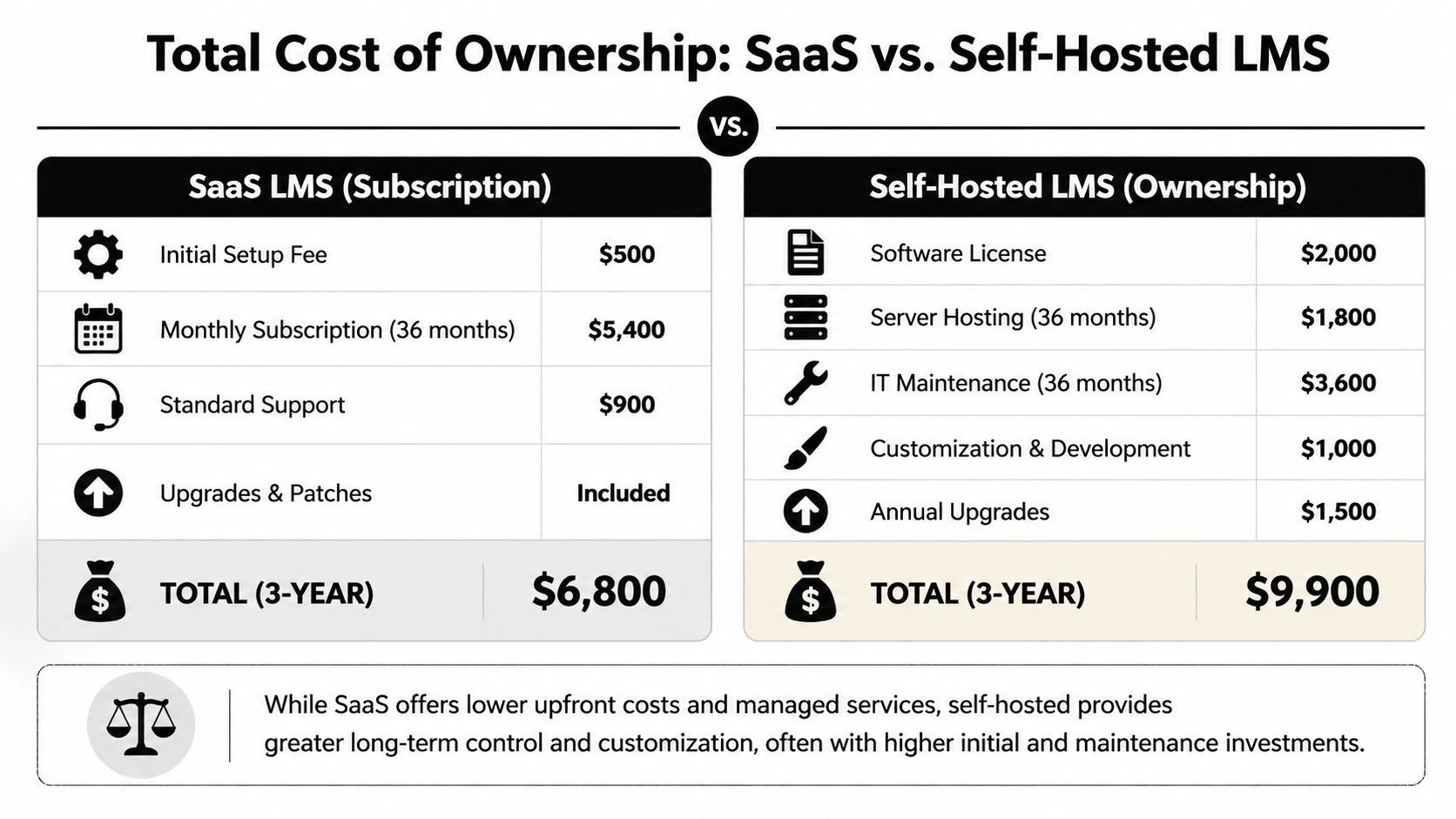
A useful way to read the infographic is this: SaaS keeps the upfront decision easy, while self-hosted changes the cost profile. You spend less time on setup with SaaS, but you accept recurring fees and plan limits. With self-hosted, you pay more attention to hosting, maintenance, and implementation early so you can reduce recurring platform rent later.
The hidden penalties usually show up in five places:
- User growth fees: entry plans are priced for a small internal team, not for clients, partners, contractors, or paid learners
- Feature gating: custom branding, advanced reporting, automation, and integrations often require a higher tier
- Admin limits: some plans restrict the number of instructors, portals, or business units, which matters as soon as training spreads across departments
- Migration cost: exporting courses is only part of the job. You also have to rebuild workflows, notifications, permissions, and reporting
- Infrastructure waste: self-hosted can stay cost-efficient, but only if you optimize cloud spending and avoid oversized hosting
I see one mistake repeatedly. Owners treat SaaS overages and forced upgrades as normal operating expense, but treat self-hosted setup work as a special burden. From a finance perspective, both are real costs. One is just easier to ignore because it arrives in smaller monthly charges.
A better comparison looks like this:
| Cost question | SaaS LMS | Self-hosted LMS |
|---|---|---|
| Launch cost | Lower at the start | Higher at the start |
| Cost after team or learner growth | Often rises with seats, usage, or feature tiers | Usually tied more to hosting, support, and chosen extensions |
| Branding control | Often limited by plan | Usually broader if you control the stack |
| Integration flexibility | Defined by vendor roadmap and tier | Defined more by your implementation budget and technical setup |
| Exit cost | Can be high if content, users, and reporting are tightly tied to the vendor | Usually lower if you own files, database access, and hosting |
| Budget predictability over 3 to 5 years | Can deteriorate as requirements expand | Often improves once setup is stable |
There is a trade-off here. Self-hosted is not automatically cheaper, and it is not automatically easier. A small business with no technical support and a short-term training need may still make the right call with SaaS. But a business that expects to train staff, customers, and partners over several years should take ownership seriously. That is where TCO shifts.
For growing companies, the comparison is not monthly fee versus hosting bill. It is recurring vendor rent versus controlled infrastructure and owned configuration. If you want a broader view of the product models behind that decision, this comparison of different learning management system options is a useful companion piece.
The best lms for small business is often the one that gets more economical as the business grows, not the one that feels cheapest before the first launch.
Reviewing Top SaaS LMS Platforms for SMBs
SaaS LMS platforms dominate the small-business market for one reason: they remove friction. You don’t need to provision servers, manage software updates, or build much technical process before launch. For many teams, that’s the right trade.
Still, the best lms for small business in SaaS form depends on your use case, not on whichever vendor appears most often in roundup lists.
TalentLMS and the fast-start category
If you ask ten people for a beginner-friendly LMS, TalentLMS will come up a lot. That reputation is earned. According to Zanfia’s small business LMS guide, TalentLMS is trusted by over 10,000 organizations, offers a free plan for up to 5 users and paid plans starting around $69 to $119 per month, and is widely recommended because it fits small-business budgets while keeping setup light.
That combination explains why it’s near the top of so many lists. It’s approachable, scalable in the SaaS sense, and practical for onboarding, compliance basics, or customer education when you want to move quickly.
Here’s how I’d frame several common SaaS options:
| Platform | Best fit | Pricing detail from verified data | Watch-out |
|---|---|---|---|
| TalentLMS | SMBs that want easy setup and low IT involvement | Free plan for up to 5 users. Paid plans start around $69 to $119 per month | Cost scales by plan and active users |
| iSpring Learn | Businesses that want straightforward per-user pricing | Around $3.75 to $3.97 per user per month | User-based pricing grows with team size |
| 360Learning | Teams that want collaborative learning workflows | $8 per user per month | Can become expensive as learner count rises |
| EducateMe | Smaller teams with a moderate monthly budget | $79 per month or $2 per user with a minimum threshold | Pricing structure needs careful fit |
| Connecteam | Deskless or operational teams | $29 per month | Feature fit matters more than price alone |
When SaaS makes the most sense
SaaS is usually the best fit when the business has one or more of these conditions:
- You need to launch fast: The team wants a working LMS with minimal setup work.
- You have little internal technical capacity: Nobody wants to touch hosting, updates, or infrastructure.
- Your use case is narrow: Internal onboarding or standard employee training often works well in SaaS.
- You value vendor-managed support: Convenience matters more than platform ownership.
A useful parallel exists with website systems. If you're weighing flexibility versus simplicity more broadly, this guide to compare small business CMS platforms reflects many of the same trade-offs owners face with LMS software.
Where SaaS can start to pinch
The pain usually appears after adoption, not before it. A small team chooses SaaS because it’s simple, then adds training for customers, contractors, franchisees, or multiple departments. That’s when user-based pricing and plan boundaries start to influence operating decisions.
Good SaaS products solve the technical burden. They don’t remove the business burden of recurring cost.
For balanced vendor research, this broader comparison of LMS platforms is worth reviewing alongside each vendor’s pricing page. The headline recommendation may still be SaaS. The smart decision is knowing exactly why.
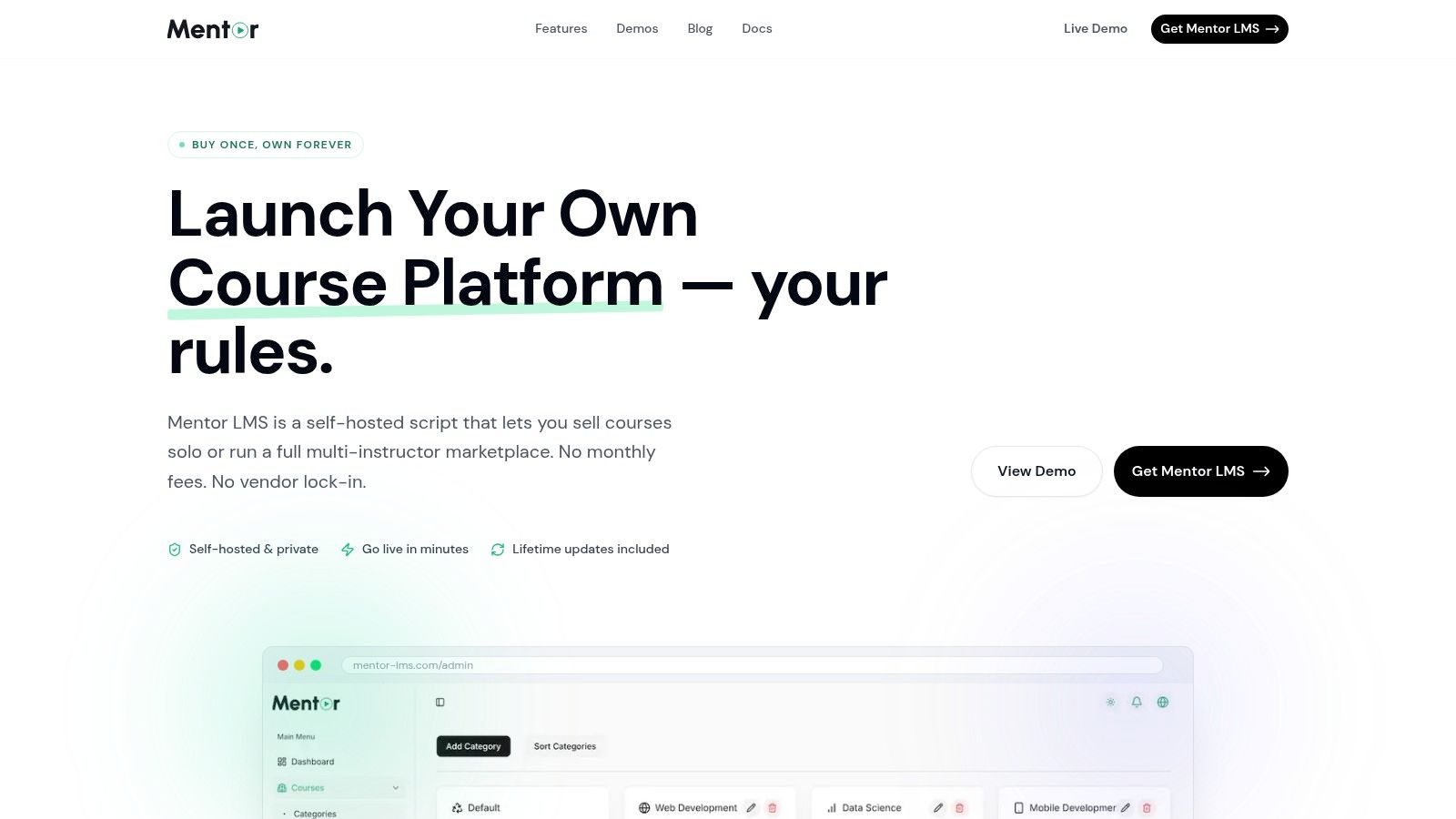
The Ownership Advantage A Deep Dive into Mentor LMS
For some small businesses, software should stay rented. For others, renting becomes the expensive choice. That second group is where ownership starts to look less like a technical preference and more like a business decision.
The strongest argument for a self-hosted LMS isn’t ideology. It’s predictability. If you plan to grow your course catalog, add more learners, involve multiple instructors, or fully brand the experience, ownership removes the anxiety of wondering which upgrade threshold you’ll hit next.
The three features small businesses keep valuing
In practice, small teams don’t rave about architecture. They rave about features that stop future billing pain.
The first is unlimited courses, students, and instructors, so growth no longer feels like a metered event. You can add training without immediately thinking about per-user billing pressure.
The second is full white-label branding. For agencies, consultants, and businesses selling education, this changes how the product is perceived. A branded portal feels like part of the business, not borrowed software.
The third is simple reporting. Owners want clear records showing who completed what and when. They don’t want a reporting suite that requires a specialist to export basic completion proof.
Small businesses usually prefer systems that make growth operationally easier, not systems that simply postpone the next pricing decision.
Why the cost model stands out
The publisher’s brief gives unusually concrete practical numbers here. The stated one-time lifetime license is about $59, and the typical first-year total cost including hosting and basic setup is about $250 to $450. Those numbers matter because they align with what many small businesses want from a first LMS purchase: low complexity and cost control.
That sits in sharp contrast to the subscription norm. According to BizLibrary’s small business LMS pricing overview, most SaaS LMS platforms for SMBs are priced between $3 and $8 per user per month, with examples including 360Learning at $8 per user per month and EducateMe at $79 per month. The same verified data also notes that self-hosted models avoid recurring subscriptions that can increase over time.
What helps small teams go live faster
Self-hosted platforms lose buyers when setup feels intimidating. That’s why packaged deployment support matters so much.
The setup shortcuts described in the brief are practical, not decorative:
- One-click branding package: Apply colors, logo placement, and email templates quickly.
- Starter course template: Duplicate a prebuilt structure with modules, quizzes, and certificate settings.
- Quick installation script: Reduce technical setup work for a standard VPS deployment.
- Small business dashboard preset: Keep admin and learner views clean for lean teams.
Those shortcuts are paired with a stated go-live range of 3 to 5 days for many small businesses. That matters because it narrows one of the traditional gaps between SaaS convenience and self-hosted control.
Where this model fits best
This kind of ownership-first LMS is a strong fit when you need one or more of the following:
- A branded client-facing academy
- A course-selling business with no desire for platform revenue share
- An internal training hub that won’t punish growth with user fees
- A multi-instructor setup for agencies, creators, or marketplace models
It’s not the right answer for every SMB. If your only requirement is to upload a few onboarding videos for a tiny internal team, SaaS may still be simpler. But if you view the LMS as part of your business asset base, ownership changes the economics and the control.
Case Study How a 4-Person Agency Made $2740 in 3 Months
The clearest way to understand LMS ownership is to look at a small business that didn’t buy software for HR admin. It bought software to open a revenue stream.
A digital marketing agency with 4 team members wanted to create and sell its own online courses. It didn’t need an enterprise learning department. It needed a platform it could brand, launch quickly, and run without adding a permanent monthly software burden.

The investment and the launch
The agency bought a lifetime license for about $59 and paid for basic setup and branding, bringing the total investment to $380 based on the publisher’s brief. The team launched its first course in 12 days.
That launch window matters. A lot of small businesses assume self-hosted always means a long build cycle. In this case, the business got to market quickly enough that setup didn’t become the bottleneck.
The business also made a clean financial decision. It spent once to create an owned training asset rather than stacking another recurring platform bill onto monthly overhead.
The payoff
In the first 3 months, the agency made $2,740 in course sales. Based on the figures provided, the LMS paid for itself in under 2 months. After that, the owner said the training side of the business ran with almost no extra monthly cost beyond payment processing fees.
That’s the kind of result that changes how an owner sees software. The LMS stops being a cost center and starts acting like infrastructure for revenue.
A small business doesn’t need massive course volume to benefit from ownership. It needs enough traction that recurring software fees would start eating margin.
A short product walkthrough helps put that use case in context:
Why this case matters
This story isn’t only about course sales. It highlights three decisions small businesses often get right when they choose carefully:
- They keep the initial spend contained: The business didn’t overbuy.
- They launch before overengineering: A working branded course beat a perfect future roadmap.
- They preserve margin after launch: Revenue wasn’t constantly reduced by an expanding LMS subscription.
For businesses exploring the best lms for small business, this is the ownership case in its simplest form. If training is part of the product, not just an internal process, long-term software economics matter even more.
Your Go-Forward Plan Choosing the Right LMS Path
By this point, the right choice should feel narrower.
If your business wants the fastest path to a working LMS, has limited internal technical bandwidth, and only needs a straightforward training portal, a SaaS platform is still a valid answer. Pick one with transparent pricing, test the reporting before you commit, and verify what happens when you add more learners, branding needs, or integrations.
If your business wants tighter cost control, stronger branding, and freedom from recurring platform dependency, ownership is usually the smarter path. That’s especially true if training supports revenue, client delivery, or a growing catalog that won’t stay small for long.
Two practical paths
Here’s the decision in plain terms:
Choose SaaS if convenience is the priority
- You need to launch quickly
- You don't want to manage hosting
- Your training scope is modest and mostly internal
- You accept that future upgrades may change the cost structure
Choose ownership if control is the priority
- You want predictable economics
- You need full white-label branding
- You expect more learners, courses, or instructors over time
- You want the LMS to become a business asset, not an endless subscription
Final decision filter
Use this last test before signing anything:
| If this matters most | Lean toward |
|---|---|
| Speed and low technical effort | SaaS LMS |
| Long-term cost control | Self-hosted LMS |
| Strong vendor-managed convenience | SaaS LMS |
| Brand control and customization | Self-hosted LMS |
| Building a course business | Self-hosted LMS |
| Basic internal onboarding only | SaaS LMS |
One more consideration often gets overlooked. An LMS is part of a wider operating system for your business. If you’re also reviewing repetitive admin work, handoffs, and process efficiency, RedactAI's automation guide is a useful companion read because training software works best when it fits broader workflow automation.
The best lms for small business isn’t one universal product. It’s the platform model that matches how you plan to grow, what you can afford to carry, and how much control you want over a system that may become far more important than it seems on day one.
If you want an LMS you can buy once and fully own, Mentor LMS is worth a close look. It’s built for businesses that want a branded training platform, unlimited growth without per-user penalties, and the flexibility to run internal training, paid courses, or even a multi-instructor marketplace. You can explore the platform, review the documentation, and reach out through the site if you want help with setup, branding, or custom development.